 Facundo Uferer
Introduction
AI drafts the user stories, turns them into issues, and implements each issue as a slice of code. The developer stops writing every line and becomes an orchestrator: they define what gets built, validate what the AI produces at each step, and decide what gets merged. The key is that a story, an issue, a slice, and a PR are the same unit of work, sized just right for an agent to solve it well.
Most projects are organized by technical layers: Controllers/, Services/, Repositories/, DTOs/ (a DTO, Data Transfer Object, is an object that only carries data between parts of the system, with no logic). With that structure, any change forces the agent to read and touch four or five folders full of code unrelated to the task.
VSA organizes code by use case. The agent receives a bounded task, works in a single folder, and delivers a change the orchestrator reviews in minutes.
What VSA is
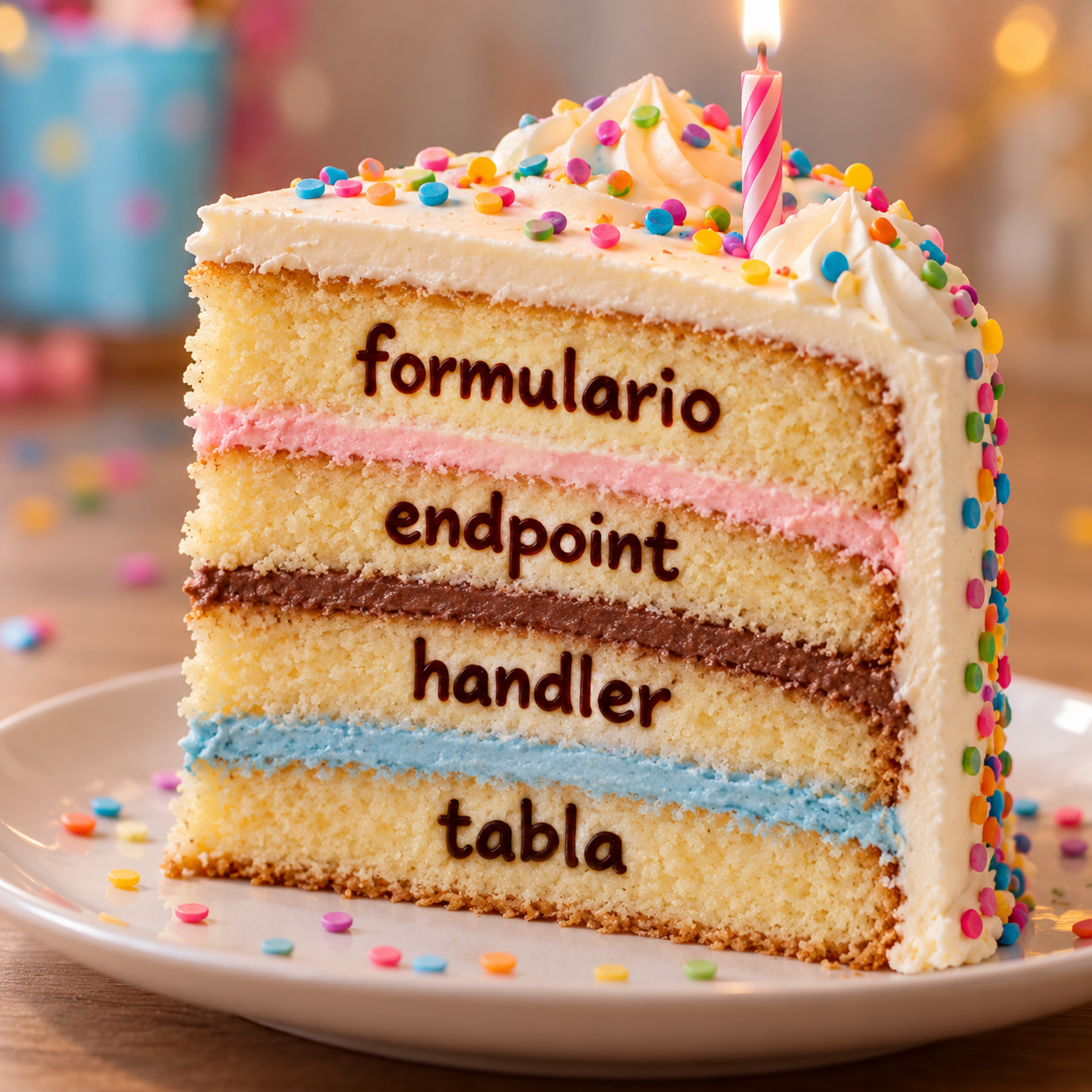
Hence the name: if the system is a layer cake, a feature is not an entire layer but a vertical slice that carries a bit of each one.
A vertical slice is a complete use case with everything it needs: endpoint, validation, business logic, data access, DTOs, and tests. Jimmy Bogard, who popularized the approach, sums it up in one principle: minimize coupling between slices and maximize coupling within each slice (source).
The difference shows in the folder structure:
Three rules the agent must follow, and that are worth writing down in the repository:
- One slice = one use case. A command (“enroll student”) or a query (“list students”), in the style of CQRS (Command Query Responsibility Segregation: separating the operations that modify data, the commands, from those that only read it, the queries).
- Slices do not import each other. What is truly shared (domain entities, authentication, database connection) goes in
Shared/. - Duplication is acceptable. Two slices may have similar DTOs. That is preferable to a shared DTO that, when changed for one case, breaks another.
Preparing the repository to work with AI
Before assigning the first issue to an agent, the repository has to spell out the rules the agent cannot guess. With VSA, code is organized by convention alone, so that convention has to be written down and verified automatically.
- An
AGENTS.mdfile at the root with the slice conventions (or whichever instructions file the agent reads). - A complete reference slice for the agent to copy.
- The issue template in the repo (for example,
.github/ISSUE_TEMPLATE/slice.md), for the AI to fill in. - Architecture tests, generated by the AI, that fail if one slice imports another.
- CI that runs the tests and the architecture tests on every PR.
- AI test review: a second agent checks that the tests cover every criterion in the issue before implementation; the orchestrator resolves only what that agent flags.
- Periodic review of
Shared/: when the AI repeats the same thing across several slices, it gets extracted.
Example AGENTS.md:
# Conventions
- Each use case lives in Features/<Module>/<Verb><Noun>/
- Files in a slice: request, response, handler, and tests, using the
  project's language extension
- Slices do not import each other. Shared code goes in Shared/.
- Reference slice: Features/Students/CreateStudent/
- One PR = one issue = one slice.
- Write the tests before the code, one per acceptance criterion.
- Issue titles are use-case verbs, never layers.
Stories, issues, and slices: the same unit
A good user story is already vertical: it describes an outcome the user gets, not a technical layer. With VSA, that unit passes intact through the whole process, and at each level the AI produces the artifact and the orchestrator validates it.
| Level | Example | What the AI does | What the orchestrator validates |
|---|---|---|---|
| User story | As a teacher, I want to enroll a student in a course so they can access the classroom. | Drafts it from notes, requests, or the current system | That it reflects the real need; the priority |
| Issue | #42 Enroll student in course | Derives it from the story, with criteria, folder, and reference slice | That it is a vertical slice and not a layer |
| Tests | One test per acceptance criterion | Writes them before the code; a second agent checks they cover the criteria | Only what the reviewing agent flags |
| Slice | Features/Enrollments/EnrollStudent/ | Implements it by copying the reference slice | CI does it with architecture tests |
| PR | feature/42-enroll-student, a single folder | Opens it and fixes it based on comments | The final review and the merge |
The most common AI mistake when generating issues is slicing by layer: “create enrollments table”, “create endpoint”, “create screen”. None of them delivers value on its own, and none can be tested end to end. When that happens, reject the split and ask it to redo it by use case: a closed issue has to be a working feature.
Option A: user stories + issues
This fits when there are business users and a product with several features to prioritize. The story lives at a higher level (epic, milestone, or label) and each issue is a slice of that story.
Flow with AI:
- The AI drafts the stories from the need, meeting notes, or the description of the current system.
Prompt: “From these notes, propose user stories for the enrollment module, in the As a / I want / so that format.”
- The orchestrator prioritizes and approves the stories.
- The AI turns each story into issues, one per slice, filling in the repository template.
Prompt: “Turn story #12 into issues. Each issue must be a vertical slice, with acceptance criteria, a folder under Features/, and a reference slice. Use the template in AGENTS.md.”
- The orchestrator reviews the split (see How to validate the split the AI proposes) and only then assigns the issues to the agent.
Issue template the AI fills in:
## #42 Enroll student in course
Story: #12 Enrollment management
As a teacher, I want to enroll a student in a course so they can access the classroom.

### Acceptance criteria
- [ ] Student already enrolled → 409 error
- [ ] Course has no seats left → 422 error
- [ ] Successful enrollment → 201 and appears in the course roster

### Slice
Features/Enrollments/EnrollStudent/

### Reference
Features/Students/CreateStudent/

### Do not touch
Other slices. Changes to Shared/ must be flagged in the PR.
Option B: issues only
This fits small teams, internal systems, or migrations, where the story format adds ceremony without adding clarity. The AI drafts the issue directly from a short request.
Prompt: “Write an issue for ‘enroll student in course’ using the template in AGENTS.md. The goal is for the student to access the course classroom.”
Expected result:
## Enroll student in course
So that: the student can access the course classroom.

- [ ] Already enrolled → 409
- [ ] No seats left → 422
- [ ] OK → 201

Slice: Features/Enrollments/EnrollStudent/
Reference: Features/Students/CreateStudent/
In both options there is one rule worth including in the prompt: the issue title is a verb that a user or system performs (“Enroll student”, “List active courses”), never a layer (“Create course repository”).
| Stories + issues | Issues only | |
|---|---|---|
| Best for | Products with business users and prioritization | Small teams, internal systems, migrations |
| Planning prompts | Two: stories, then issues | One: the issue directly |
| Orchestrator validations | Stories and the split into issues | Only the split into issues |
| Unit the agent receives | One issue = one slice | One issue = one slice |
How to validate the split the AI proposes
The AI proposes how to split the stories; the orchestrator decides. When a story is large, the right split produces thinner stories that are still vertical. This table helps correct the AI when it splits badly:
| Instead of splitting by… | Split by… |
|---|---|
| Layer: table, endpoint, screen | Rule variant: simple enrollment → with waiting list |
| Component: backend, frontend | Happy path first, error cases later |
| ”All of course CRUD” | Each operation: create, edit, deactivate, list |
| Generic infrastructure up front | Only the infrastructure the first slice needs |
Criteria for accepting an AI-generated issue (INVEST):
- It can be tested end to end, on its own.
- It touches a single folder under
Features/, plus minor changes inShared/. - The PR can be reviewed in one sitting.
- It has between two and six acceptance criteria. More than that usually means it is two slices.
One reasonable exception: the project’s technical foundation (authentication, database connection, CI) is built once, horizontally, before the first slice.
The same AI can do a first review of the split before the orchestrator:
Prompt: “Review these issues. Flag any that touches more than one folder under Features/, is named after a layer, or has more than six criteria, and propose how to split it into vertical slices.”
Implementing each issue with an agent
Once the issue is approved, the agent implements it. The issue is the prompt: it says what to do, where to do it, what not to touch, and when it is done.
- Assign the issue. The prompt is short because the issue already has everything: “Implement issue #42 following AGENTS.md.”
- Tests first. The agent turns each acceptance criterion into a test inside the slice folder. A second agent checks that the tests cover what the issue asks for before moving on; the orchestrator resolves whatever that agent flags.
- Implementation. The agent copies the structure of the reference slice and writes code until the tests pass.
- CI. The tests and the architecture tests run. If they fail, the agent fixes and tries again.
- Orchestrator review. The PR touches a single folder and is reviewed quickly. Changes are requested with a PR comment and the agent applies them.
- Merge and close. The PR closes the issue (
Closes #42).
Because slices are independent, several issues can be assigned to several agents in parallel without merge conflicts.
The two loops back to the agent (CI and review) are what keep quality up: the agent does not decide when it is done.
How to implement it: mattpocock/skills
To avoid building everything from scratch, the process can be set up on top of mattpocock/skills, an open collection (MIT license) that works with Claude Code, Codex, Copilot, Gemini CLI, Cursor, and other agents.
1. Install
One method per agent: installing both the plugin and the files duplicates the skills.
| Agent | Command |
|---|---|
| Claude Code | claude plugin install mattpocock-skills@claude-plugins-official |
| Codex | codex plugin marketplace add mattpocock/skills, then codex plugin add mattpocock-skills@mattpocock |
| GitHub Copilot (CLI and VS Code) | copilot plugin marketplace add mattpocock/skills, then copilot plugin install mattpocock-skills@mattpocock |
| Gemini CLI | gemini skills install https://github.com/mattpocock/skills.git --path skills/engineering |
| Others (Cursor, OpenCode, Windsurf…) | npx skills@latest add mattpocock/skills -a <agent>, including setup-matt-pocock-skills when it asks which skills to install |
2. Configure the repository (once)
Run /setup-matt-pocock-skills. It asks which issue tracker to use (GitHub, GitLab, local files, or other), which labels are used to classify issues, and where to store documentation. Then add the AGENTS.md with the slice conventions from the Preparing the repository section.
3. Align with the AI: /grill-with-docs
The AI interviews the orchestrator, one question at a time, until every decision is explicit. Along the way it maintains a domain glossary (GLOSSARY.md) and records architecture decisions (ADRs). This is the stage where the user stories are born.
4. Write the specification: /to-spec
Turns the conversation into a specification and publishes it to the issue tracker. It plays the role of the user story or the epic.
5. Split into vertical issues: /to-tickets
This is the central step. It runs on the specification, for example /to-tickets #12, and:
- Reads the specification and explores the code; if it helps, it proposes a preparatory refactor to make the work easier.
- Splits the work into tracer bullet tickets: each one cuts through every layer, can be verified on its own, and fits in a fresh context window.
- Marks the dependencies: which ticket blocks which.
- Shows the list to the orchestrator and asks whether the granularity is right, whether the dependencies are real, and whether tickets should be merged or split. It iterates until the orchestrator approves.
- Publishes one issue per ticket, with acceptance criteria and the
ready-for-agentlabel (or one file per ticket under.scratch/<feature>/issues/if local files were chosen).
Step 4 is the validation of the split. To reinforce it, before approving you can run the control prompt from How to validate the split over the list. One detail: /to-tickets avoids putting file paths in issues because they go stale, so the folder for each slice is defined by the AGENTS.md convention, not by the issue.
6. Implement: /implement or /implement-spec
/implementtakes the tickets, works with/tdd(first a failing test, then the code that makes it pass), runs the tests, and closes with/code-review. That review uses parallel subagents that check two things separately: whether the code follows the repo’s standards and whether it faithfully implements the issue. It is the reviewing agent this article describes./implement-specworks through a complete specification: it launches several subagents in parallel on the tickets that have no blockers.
Every few days it is worth running /improve-codebase-architecture, which looks for where the structure is degrading and proposes improvements.
Mapping to the process
| Stage in this article | Skill |
|---|---|
| Prepare the repository | /setup-matt-pocock-skills + your own AGENTS.md |
| Draft stories | /grill-with-docs + /to-spec |
| Turn stories into vertical issues | /to-tickets |
| Validate the split | /to-tickets questions + control prompt |
| Tests first | /tdd |
| Implement the slice | /implement |
| Reviewing agent | /code-review |
| Several slices in parallel | /implement-spec |