Facundo Uferer
So far, you’ve learned to organize your data in linear structures: lists, stacks, and queues. In these, each element has a single successor (like a supermarket line). But the real world isn’t always a straight line. Sometimes data is organized hierarchically, like a company’s org chart, the files on your computer, or the branches of a tree.
That’s where the binary tree comes in.
In this lesson you’ll learn:
- What a binary tree is and why it’s so powerful.
- The anatomy of a tree (root, leaves, subtrees).
- How to define a node in C using structures and pointers.
- What a Binary Search Tree (BST) is and how to organize data in it.
- How to insert, search, and traverse elements using the magic of recursion.
Why do we need Binary Trees?
Imagine you have a linked list with 1,000,000 sorted numbers and you want to find the number 999,999. You’d have to traverse almost the entire million nodes, one by one, to find it. That’s slow!
A binary search tree lets us split the problem in half at each step. It’s like looking up a word in a dictionary: if you open the book in the middle and see the word starts with ‘Z’, you discard the entire left half immediately. Instead of asking a million questions, in a well-balanced tree you can find your data in about 20 steps.
Anatomy of a Tree
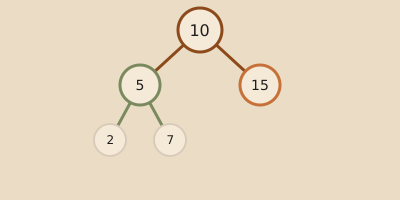
Picture a tree upside down (with the root at the top and branches growing downward):
       [ Root: 50 ]          <-- The main node, where everything starts
       /          \
  [ 30 ]          [ 70 ]     <-- Internal nodes (have parent and children)
  /    \          /    \
[20]  [40]      [60]  [80]   <-- Leaves (final nodes, have no children)
Key concepts to remember:
- Root: The top node of the tree. It has no “parent”.
- Child: Node that hangs from another above it. In a binary tree, each node can have at most two children (left child and right child).
- Parent: Node that has branches to nodes below it.
- Leaf: Nodes that have no children (their left and right pointers point to
NULL). - Subtree: Each child of a node can itself be considered the root of its own smaller tree. This is the basis of recursion!
Defining a Node in C
To build this structure in C, we need to define a struct that stores the value (the data) and two pointers: one for the left child and one for the right child.
#include <stdio.h>
#include <stdlib.h> // For malloc and free

// Definition of a Node structure
struct Nodo {
    int dato;                  // The value stored in the node
    struct Nodo* izquierdo;    // Pointer to the left subtree
    struct Nodo* derecho;      // Pointer to the right subtree
};
[!NOTE] Pay attention to this:
struct Nodo*is a pointer to another node of the same type. It’s a self-referential structure. This is how we link nodes together.
Creating a New Node
To add elements to the tree, we first need to be able to create nodes in system memory (the Heap) using malloc.
// Helper function to create a new node
struct Nodo* crearNodo(int valor) {
    // 1. Allocate memory for the node
    struct Nodo* nuevoNodo = (struct Nodo*)malloc(sizeof(struct Nodo));

    // 2. Assign the value
    nuevoNodo->dato = valor;

    // 3. Initialize children as empty (NULL)
    nuevoNodo->izquierdo = NULL;
    nuevoNodo->derecho = NULL;

    return nuevoNodo;
}
The Golden Rule: Binary Search Tree (BST)
An ordinary binary tree has no established order. But to search data quickly, we use the Binary Search Tree (BST). Its rule is very simple and strict:
For any node in the tree:
- All values in its left subtree must be less than the node’s value.
- All values in its right subtree must be greater than the node’s value.
Inserting Data
To insert an element respecting this rule, we use recursion:
// Function to insert a value into the tree
struct Nodo* insertar(struct Nodo* raiz, int valor) {
    // Base case: if the tree (or subtree) is empty, create the node there
    if (raiz == NULL) {
        return crearNodo(valor);
    }

    // If the value is smaller, go to the left subtree
    if (valor < raiz->dato) {
        raiz->izquierdo = insertar(raiz->izquierdo, valor);
    }
    // If the value is greater, go to the right subtree
    else if (valor > raiz->dato) {
        raiz->derecho = insertar(raiz->derecho, valor);
    }

    // Return the node pointer (unchanged)
    return raiz;
}
Searching for an Element
Searching in a BST is extremely efficient because at each node we decide whether to go left or right, discarding the other half of the tree.
// Function to search for a value in the tree
struct Nodo* buscar(struct Nodo* raiz, int valorBuscado) {
    // Base case: if the tree is empty or we found the value
    if (raiz == NULL || raiz->dato == valorBuscado) {
        return raiz;
    }

    // If the value is smaller, search on the left
    if (valorBuscado < raiz->dato) {
        return buscar(raiz->izquierdo, valorBuscado);
    }

    // If the value is greater, search on the right
    return buscar(raiz->derecho, valorBuscado);
}
Traversals (How to read the tree)
In a linear list, you read from start to finish. In a tree, you have different ways to visit it. The three main ones are recursive:
- Pre-order: Visits the root first, then the left subtree, then the right subtree. (Root -> Left -> Right).
- In-order: Visits the left subtree first, then the root, then the right subtree. (Left -> Root -> Right).
[!TIP] In a BST, the in-order traversal will always show the numbers sorted from smallest to largest!
- Post-order: Visits the left subtree first, then the right subtree, and finally the root. (Left -> Right -> Root).
In-order Traversal Implementation in C
// Function to print the tree in-order
void inorden(struct Nodo* raiz) {
    if (raiz != NULL) {
        inorden(raiz->izquierdo);     // 1. Traverse left subtree
        printf("%d ", raiz->dato);    // 2. Visit current node (root)
        inorden(raiz->derecho);       // 3. Traverse right subtree
    }
}
A Complete Example to Try
Here’s a complete, functional C program you can compile and run. This program creates a tree, inserts some values, prints them sorted, and performs a search:
#include <stdio.h>
#include <stdlib.h>

struct Nodo {
    int dato;
    struct Nodo* izquierdo;
    struct Nodo* derecho;
};

struct Nodo* crearNodo(int valor) {
    struct Nodo* nuevoNodo = (struct Nodo*)malloc(sizeof(struct Nodo));
    nuevoNodo->dato = valor;
    nuevoNodo->izquierdo = NULL;
    nuevoNodo->derecho = NULL;
    return nuevoNodo;
}

struct Nodo* insertar(struct Nodo* raiz, int valor) {
    if (raiz == NULL) return crearNodo(valor);

    if (valor < raiz->dato) {
        raiz->izquierdo = insertar(raiz->izquierdo, valor);
    } else if (valor > raiz->dato) {
        raiz->derecho = insertar(raiz->derecho, valor);
    }
    return raiz;
}

void inorden(struct Nodo* raiz) {
    if (raiz != NULL) {
        inorden(raiz->izquierdo);
        printf("%d ", raiz->dato);
        inorden(raiz->derecho);
    }
}

struct Nodo* buscar(struct Nodo* raiz, int valor) {
    if (raiz == NULL || raiz->dato == valor) return raiz;
    if (valor < raiz->dato) return buscar(raiz->izquierdo, valor);
    return buscar(raiz->derecho, valor);
}

int main() {
    struct Nodo* raiz = NULL;

    // Insert elements
    raiz = insertar(raiz, 50);
    insertar(raiz, 30);
    insertar(raiz, 70);
    insertar(raiz, 20);
    insertar(raiz, 40);
    insertar(raiz, 60);
    insertar(raiz, 80);

    // Print in-order traversal (should be sorted from smallest to largest)
    printf("Elements in the tree (In-order traversal): ");
    inorden(raiz);
    printf("\n");

    // Search for an element
    int numeroABuscar = 40;
    struct Nodo* encontrado = buscar(raiz, numeroABuscar);
    if (encontrado != NULL) {
        printf("The number %d was found in the tree.\n", numeroABuscar);
    } else {
        printf("The number %d does not exist in the tree.\n", numeroABuscar);
    }

    return 0;
}
Summary of Learnings
- The binary tree organizes information in hierarchies, not rows.
- A node consists of a value and two self-referential pointers (
izquierdoandderecho). - In a BST, smaller values go to the left of the node and larger values to the right, enabling ultra-fast searches.
- Recursion is the natural tool for working with trees, since each subtree is itself an independent tree.