Facundo Uferer
After learning if-else, another frequent need appears: choosing between several possible options based on the value of a variable.
That’s what switch is for.
But this lesson isn’t just about switch. It’s also a very good time to better understand code blocks and some instructions that alter flow within those blocks, like break.
In this lesson you’ll learn:
- what problem
switchsolves - how to write a
switch - what
breakis for - what happens if
breakis missing - what
defaultis - what code blocks are
- how some instructions alter the flow of a block
When should you use switch?
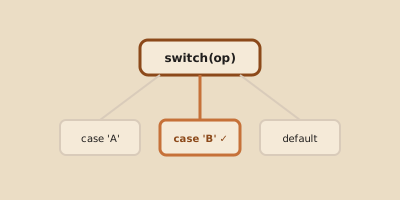
switch is useful when you want to compare the same variable against several possible values.
For example:
- a number representing a day
- a menu option
- a simple selection code
In those cases, a switch can be clearer than a long chain of comparisons.
General syntax
switch (variable) {
    case value1:
        instructions;
        break;

    case value2:
        instructions;
        break;

    default:
        instructions;
}
Basic example
#include <stdio.h>

int main() {
    int dia = 3;

    switch (dia) {
        case 1:
            printf("Monday\n");
            break;
        case 2:
            printf("Tuesday\n");
            break;
        case 3:
            printf("Wednesday\n");
            break;
        default:
            printf("Invalid value\n");
    }

    return 0;
}
What does break do?
break cuts off the execution of switch when the corresponding case has already been executed.
If the value of dia is 3, the program enters case 3, shows Wednesday, and then break makes it exit the switch.
What happens if break is missing?
Here’s one of the behaviors that confuses most at first.
If break is missing, the program may continue executing the next case.
Example
switch (opcion) {
    case 1:
        printf("Option 1\n");
    case 2:
        printf("Option 2\n");
        break;
}
If opcion is 1, both outputs might execute, because there was no break at the end of case 1.
That’s why, when starting, the practical rule is very simple:
if you don’t want it to fall through to the next case, use
break.
What does default do?
default represents the default case, that is, what should happen if no case matches.
default:
    printf("Invalid option\n");
It’s not always mandatory, but almost always a good idea to have it.
What is a code block?
A code block is a set of statements enclosed between braces.
{
    printf("Hello\n");
    printf("World\n");
}
Those two statements form a block.
Blocks appear in many control structures:
ifelseswitchwhilefordo-while
Why do blocks matter?
Because they help organize which instructions belong to each part of the flow.
Without clear blocks, the program becomes hard to read and more prone to errors.
Instructions that alter flow within a block
break
You already saw that break is used to exit a switch.
Later you’ll also see it inside loops, where it allows cutting off a repetition early.
continue
continue is used in loops, not in switch, and serves to skip to the next step of the repetition.
For now, it’s enough to recognize that there are instructions that can alter the normal course of a block.
return
return ends the current function.
In main, for example:
return 0;indicates that the main execution finished.
Relationship between switch and blocks
Although visually switch seems like a different structure, it still organizes the flow into delimited blocks and cases.
Learning to read that structure well is key to not getting lost inside the code.
Common mistakes when starting
1. Forgetting break
It’s the classic switch error.
2. Using switch for everything
switch doesn’t magically replace every decision. It’s useful when you’re comparing the same variable against several concrete values.
3. Disorganizing blocks
If you don’t indent well or don’t use braces clearly, the code becomes a mess to read.
Summary
switchallows choosing between several options based on a variable’s valuecaserepresents each possible alternativebreakcuts off the execution of theswitchdefaultcovers the case where there were no matches- code blocks group related instructions
- some statements, like
break, alter the block’s flow
Final thought
Learning switch isn’t just learning another syntax.
It’s learning to organize multiple decisions in a clear and controlled way.
And understanding code blocks is key to not losing sight of which instructions belong to each part of the program.