Facundo Uferer
In many programs it’s not enough to work only with numbers. We also need to work with text: names, last names, cities, messages, passwords, phrases, and much more.
In C, that text isn’t handled with a special type called string, as happens in other languages. In C, a character string is represented as an array of characters.
And this is KEY to understand from the beginning.
A string in C isn’t magic. It’s an array of
charwith an end marker.
In this lesson you’ll learn:
- what a character string is
- how it relates to arrays
- what
\0means - how to declare and initialize strings
- how to read strings from the keyboard
- how to traverse a string character by character
- common string operations
- useful functions from
<string.h>
Before starting, keep this idea: if you understand indices and \0, you understand strings in C. If you don’t understand that, you’ll end up copying functions from memory without knowing why they work. And that’s where strange errors appear later.
The problem: storing text isn’t storing a number
Storing a number is straightforward:
int edad = 18;Storing a character too:
char inicial = 'A';But a name like "Ana" doesn’t fit in a single char, because a char stores one character, not a whole word.
This is wrong:
char nombre = 'Ana'; /* incorrect */Why? Because 'Ana' isn’t a character. It’s several characters. To store several values of the same type we use an array.
So, to store text in C, we use an array of char:
char nombre[10];That reserves 10 memory positions to store characters.
What is a character string?
A character string is a sequence of characters stored in an array of type char.
For example:
char nombre[] = "Juan";Here it seems we store a single thing, but in reality several characters are stored:
Juan- and one more special character:
\0
What does \0 mean?
\0 is called the null character.
It’s not a letter, not a visible number, it doesn’t print like regular text. Its function is to mark the end of the string.
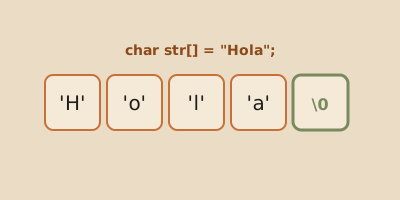
That means a string like "Juan" is represented in memory like this:
J u a n \0We can also see it with indices:
Index:       0    1    2    3    4
Content:    'J'  'u'  'a'  'n'  '\0'
This is exactly like thinking about a regular array. The difference is that when we talk about strings, \0 tells the program: “this is where the text ends.”
Why is \0 so important?
Because many functions in C don’t know how many characters you want to use. So they read character by character until they find \0.
If that end character isn’t where it should be, the program may read garbage or misbehave.
And that, friend, is one of the things that most confuses beginners.
Think of it this way: the array can have more space than the word uses.
char nombre[10] = "Ana";In memory it looks conceptually like this:
Index:      0    1    2    3    4    5    6    7    8    9
Content:   'A'  'n'  'a'  '\0' ...  ...  ...  ...  ...  ...
The string doesn’t necessarily occupy the whole array. The string ends at the first \0.
That means the array size and the actual text length are not the same.
char nombre[10]has 10 available positions"Ana"has 3 visible characters- it also needs 1 extra position for
\0
A string is an array of char
Since a string is an array, we can access its positions just like any other array.
char nombre[] = "Ana";So:
nombre[0]is'A'nombre[1]is'n'nombre[2]is'a'nombre[3]is\0
Notice something important:
'A'with single quotes represents a character"Ana"with double quotes represents a string
They’re not the same.
Declaring strings
When you declare a string, you need to think about two things:
- how many visible characters you want to store
- one extra position for
\0
This is FUNDAMENTAL. If you want to store a 4-letter word, you need at least 5 positions.
Declaration with fixed size
char ciudad[20];This reserves space to store up to 19 visible characters and the final \0.
It doesn’t mean a word is already stored there. It only means there’s reserved space.
Declaration with direct initialization
char nombre[] = "Lucia";In this case, the compiler automatically calculates the necessary size.
Since "Lucia" has 5 letters, the array needs 6 positions:
L u c i a \0Declaration specifying size and initialization
char apellido[10] = "Perez";Here space is reserved for 10 characters, even though the word uses less.
Conceptually it looks like this:
P e r e z \0 ... ... ... ...The text ends at \0; the rest of the array is available.
Characters vs strings
This may seem like a detail, but it’s not:
char letra = 'A';
char palabra[] = "A";
They’re not the same.
'A' is a single character.
"A" is a string. Even though it has only one visible letter, internally it stores:
'A' '\0'In other words, "A" needs two positions.
This difference will save you from many errors.
Example: displaying a string
#include <stdio.h>

int main() {
    char nombre[] = "Martina";

    printf("Name: %s\n", nombre);

    return 0;
}
What does %s mean?
%s is the format specifier used in printf to display strings.
Accessing individual characters
Since the string is an array, we can read each character separately.
#include <stdio.h>

int main() {
    char palabra[] = "Sol";

    printf("First character: %c\n", palabra[0]);
    printf("Second character: %c\n", palabra[1]);
    printf("Third character: %c\n", palabra[2]);

    return 0;
}
Expected output
First character: S
Second character: o
Third character: l
Notice we use %c now, because we’re showing a single character each time.
Traversing a string character by character
We can also traverse a string with a loop.
This is a key operation because it confirms the central idea: a string is processed just like an array, position by position.
#include <stdio.h>

int main() {
    char palabra[] = "Hola";
    int i;

    for (i = 0; palabra[i] != '\0'; i = i + 1) {
        printf("Character %d: %c\n", i, palabra[i]);
    }

    return 0;
}
Why is the condition palabra[i] != '\0'?
Because we don’t always need to know the exact size of the entire array. What matters is traversing the string up to its actual end.
The actual end of the string is marked by \0.
So the loop says:
continue while the current character is not the null character.
Fantastic. That’s the correct idea.
Expected output
Character 0: H
Character 1: o
Character 2: l
Character 3: a
The \0 is not printed because the loop stops just before reaching it.
Counting characters manually
Before using library functions, it’s good to know how to do an operation manually. Not because you’ll always write it that way, but because it forces you to understand the mechanism.
For example, we can count how many visible characters a string has:
#include <stdio.h>

int main() {
    char palabra[] = "perro";
    int i = 0;

    while (palabra[i] != '\0') {
        i = i + 1;
    }

    printf("Number of characters: %d\n", i);

    return 0;
}
What happens step by step?
istarts at0palabra[0]is checked- if it’s not
\0, add 1 - repeat until finding the end of the string
When the loop ends, i contains the number of visible characters.
For "perro", the result is 5.
See the idea? We don’t count the total size of the array. We count until we reach \0.
String input
Reading text from the keyboard requires more care than reading a number.
Reading a word with scanf
#include <stdio.h>

int main() {
    char nombre[20];

    printf("Enter your name: ");
    scanf("%19s", nombre);

    printf("Hello, %s\n", nombre);

    return 0;
}
What does this example do well?
nombrehas reserved spacescanfstores the entered word there%sindicates we’re reading a string%19slimits reading to 19 visible characters
Why do we use %19s and not just %s?
Because nombre has 20 positions:
char nombre[20];But one position must remain for the final \0.
So we can read at most 19 visible characters.
This:
scanf("%19s", nombre);tells scanf: “read a word, but no more than 19 characters.”
Pay attention to this: using scanf("%s", nombre) without a limit can write more characters than the array can hold. That’s called a buffer overflow and it’s a classic source of errors in C.
Important limitation of scanf("%s", ...)
It reads only up to the first space.
So:
- if you type
Ana, it readsAna - if you type
Ana Maria, it only readsAna
Also, scanf stops reading when it encounters a space, a tab, or a newline.
Reading a full line with fgets
When we need to read text with spaces, we use fgets.
#include <stdio.h>

int main() {
    char frase[100];

    printf("Write a sentence: ");
    fgets(frase, 100, stdin);

    printf("The sentence entered was: %s", frase);

    return 0;
}
What does fgets receive?
fgets(frase, 100, stdin);frase: where the text is stored100: maximum number of characters to readstdin: standard input, i.e., the keyboard
Important detail: fgets may store the newline
If you type:
Hello worldand press Enter, fgets may also store that Enter as \n, as long as there’s space in the array.
That’s why it’s often convenient to remove that \n at the end.
We can do it by traversing the string:
#include <stdio.h>

int main() {
    char frase[100];
    int i;

    printf("Write a sentence: ");
    fgets(frase, 100, stdin);

    for (i = 0; frase[i] != '\0'; i = i + 1) {
        if (frase[i] == '\n') {
            frase[i] = '\0';
        }
    }

    printf("Clean sentence: %s\n", frase);

    return 0;
}
What did we do?
- we traversed the string character by character
- we looked for the
\ncharacter - when we found it, we replaced it with
\0
That turns the newline into the actual end of the string.
Don’t memorize this as a blind recipe. Understand the concept: we modified a character of the array.
Difference between scanf and fgets
scanf("%s", cadena)
- works for a single word
- stops at the first space
- simple, but limited
fgets(cadena, tamanio, stdin)
- allows reading a full line
- accepts spaces
- usually more useful for sentences
Common string operations
Since a string is an array, many operations could be done manually with loops. But C also offers functions in the <string.h> library.
First let’s understand what each operation means:
- measure: count characters until
\0 - copy: pass characters from one string to another
- compare: check if two strings have the same characters in the same order
- concatenate: add one string to the end of another
The functions in <string.h> do these tasks for us, but internally the idea is still the same: traversing characters.
Copying a string manually
Before using strcpy, look at how to copy a string by hand:
#include <stdio.h>

int main() {
    char origen[] = "Hola";
    char destino[20];
    int i = 0;

    while (origen[i] != '\0') {
        destino[i] = origen[i];
        i = i + 1;
    }

    destino[i] = '\0';

    printf("Destination: %s\n", destino);

    return 0;
}
The most important line
destino[i] = '\0';That line puts the end of the copied string.
If you forget to copy or add the \0, the program doesn’t know where the text ends. And then the cosmic chaos begins: garbage characters, strange output, and bugs that are hard to understand.
Comparing two strings manually
We can also compare two strings character by character.
#include <stdio.h>

int main() {
    char a[] = "sol";
    char b[] = "sol";
    int i = 0;
    int iguales = 1;

    while (a[i] != '\0' || b[i] != '\0') {
        if (a[i] != b[i]) {
            iguales = 0;
        }

        i = i + 1;
    }

    if (iguales == 1) {
        printf("They are equal.\n");
    } else {
        printf("They are different.\n");
    }

    return 0;
}
Don’t worry if you later use strcmp. That’s perfectly fine. But this example shows you the underlying idea: comparing strings isn’t comparing a single thing, but comparing positions.
String length: strlen
strlen returns the number of characters in the string, not counting the \0.
That is: it does something very similar to our manual example where we counted characters until finding the end.
#include <stdio.h>
#include <string.h>

int main() {
    char palabra[] = "computadora";

    printf("Length: %d\n", strlen(palabra));

    return 0;
}
Result
The length is 11, because the word has 11 letters. The \0 is not counted.
Be careful with this: strlen does not return the total size of the array. It returns the actual length of the string up to \0.
char texto[20] = "Hola";In this case:
- the array has 20 positions
strlen(texto)returns 4
They’re different concepts.
Copying a string: strcpy
We cannot copy strings with the = sign like we do with numbers.
This is NOT correct for copying content:
/* destino = origen; */To copy a string we use strcpy.
#include <stdio.h>
#include <string.h>

int main() {
    char origen[] = "Hola";
    char destino[20];

    strcpy(destino, origen);

    printf("Destination: %s\n", destino);

    return 0;
}
Important idea
origencontains the original textdestinomust have enough spacestrcpycopies character by character, including the\0
If destino doesn’t have enough space, strcpy may write outside the array. C doesn’t save you automatically. That’s why, before copying, you need to think about whether the destination has room for the text and for the \0.
Comparing strings: strcmp
To compare if two strings are equal, we must NOT use ==.
That would be a conceptual error.
With arrays, == doesn’t compare content character by character. To compare text, you need a function that traverses both strings and checks their characters.
To compare content we use strcmp.
#include <stdio.h>
#include <string.h>

int main() {
    char clave1[] = "casa";
    char clave2[] = "casa";

    if (strcmp(clave1, clave2) == 0) {
        printf("The strings are equal.\n");
    } else {
        printf("The strings are different.\n");
    }

    return 0;
}
Why compare with 0?
Because strcmp:
- returns
0if the strings are equal - returns another value if they’re different
At this level, understanding that 0 means “they are equal” is perfectly enough.
Think of it this way:
if (strcmp(clave1, clave2) == 0)reads as:
if the content of
clave1andclave2is equal…
Concatenating strings: strcat
Concatenating means joining one string with another.
#include <stdio.h>
#include <string.h>

int main() {
    char nombre[30] = "Ana";

    strcat(nombre, " Maria");

    printf("Full name: %s\n", nombre);

    return 0;
}
Result
The variable nombre now contains:
Ana MariaCaution
The destination array must have enough space to store:
- its original content
- the string we add
- the final
\0
In this example nombre has 30 positions, so "Ana Maria" fits without issue.
Complete example with several operations
#include <stdio.h>
#include <string.h>

int main() {
    char nombre[20] = "Juan";
    char apellido[20] = "Perez";
    char completo[50] = "";

    strcpy(completo, nombre);
    strcat(completo, " ");
    strcat(completo, apellido);

    printf("Full name: %s\n", completo);
    printf("Length: %d\n", strlen(completo));

    if (strcmp(nombre, "Juan") == 0) {
        printf("The stored name is Juan.\n");
    }

    return 0;
}
Traversing a string to count vowels
In addition to using library functions, we can also solve problems by traversing the string manually.
#include <stdio.h>

int main() {
    char palabra[] = "murcielago";
    int i;
    int cantidadVocales = 0;

    for (i = 0; palabra[i] != '\0'; i = i + 1) {
        if (palabra[i] == 'a' || palabra[i] == 'e' || palabra[i] == 'i' || palabra[i] == 'o' || palabra[i] == 'u') {
            cantidadVocales = cantidadVocales + 1;
        }
    }

    printf("Number of vowels: %d\n", cantidadVocales);

    return 0;
}
This example is very valuable because it shows something key:
a string isn’t just printed or copied; it can also be processed character by character.
Possible improvement
This example counts lowercase vowels. If the word had uppercase letters, like "Murcielago", the M doesn’t matter because it’s not a vowel, but if it were "Avion", the A wouldn’t be counted with this code.
For this level that’s fine. Later you could expand the condition to include A, E, I, O, U.
The important thing now is to understand the traversal.
Common mistakes when working with strings
Confusing character with string
'A'is a character"A"is a string
They’re not the same.
Not leaving enough space
char nombre[4] = "Juan";This is wrong, because "Juan" needs:
Juan\0
That is, it needs 5 positions.
The correct version would be:
char nombre[5] = "Juan";or even better, let the compiler calculate:
char nombre[] = "Juan";Comparing strings with ==
To compare content, use strcmp.
if (strcmp(a, b) == 0) {
    printf("They are equal.\n");
}
Forgetting that scanf("%s", ...) doesn’t read spaces
If you need to read a full sentence, use fgets.
Using scanf("%s", cadena) without a limit
If the array has 20 positions, use a maximum width:
scanf("%19s", cadena);That 19 leaves room for \0.
Forgetting the \n that fgets may leave
If after reading a sentence strange newlines appear, check if fgets stored the \n.
You can replace it with \0 by traversing the string.
Thinking the array size and the string length are the same
Not necessarily.
char texto[50] = "Hola";Here the array has 50 positions, but the string has 4 visible characters.
Summary
- a string in C is an array of
char - every string ends in
\0 \0marks the actual end of the text- the array size and the string length are not the same
%sis used to display complete strings%cis used to display a single character- a string can be traversed with a loop like any array
scanf("%s", ...)reads a word, but it’s good to limit the widthfgetsallows reading sentences with spacesfgetsmay store\n, and we can replace it with\0strlenmeasures lengthstrcpycopiesstrcmpcomparesstrcatconcatenates
What you should be able to explain before continuing
Before moving to the next lesson, you should be able to answer these questions:
- why does
"Ana"need 4 positions and not 3? - what’s the difference between
'A'and"A"? - why can a string be traversed with a
fororwhile? - why doesn’t
scanf("%s", nombre)readAna Mariacompletely? - why does
strcmp(a, b) == 0mean two strings are equal? - what can happen if you forget the
\0?
If you can explain that, you’re not memorizing: you’re understanding. And that’s worth much more.
Final thought
If you understand that a string in C is an array of characters with an end marked by \0, EVERYTHING falls into place.
And when that’s truly understood, you stop memorizing isolated functions and start understanding what’s happening in memory and in the program.