Facundo Uferer
So far you’ve worked many times with one variable at a time.
For example:
int edad;
float precio;
char inicial;
That’s fine when you need to store a single piece of data.
But what if you need to store:
- 5 grades
- 10 ages
- 30 temperatures
- 7 numbers entered by the user
Are you going to create a variable for each one?
int nota1;
int nota2;
int nota3;
int nota4;
int nota5;
You could, yes. But it would be awkward, messy, and impractical.
That’s where arrays come in.
What is an array?
An array is a structure that lets you store several data of the same type under a single name.
Each piece of data is stored in a position and that position is accessed through an index.
Simple example
int notas[5];This means:
intis the data type of each elementnotasis the name of the array5is the number of reserved positions
In other words: notas can store 5 integer values.
Why is an array useful?
Because it lets you group many related data.
For example, if you want to store 5 grades, instead of having:
int nota1, nota2, nota3, nota4, nota5;you can have:
int notas[5];That organizes the program better and makes subsequent work much easier.
All elements must be the same type
In an array, all elements have the same type.
For example:
int numeros[4];here all elements are int.
And in:
char letras[6];here all elements are char.
You can’t mix an int, a float, and a char in the same array.
Indices: array positions
In C, arrays start at index 0.
This is FUNDAMENTAL. If you don’t understand this well, everything starts to break later.
If we have:
int notas[5];the valid positions are:
notas[0]notas[1]notas[2]notas[3]notas[4]
Watch out for this
If the array has 5 elements:
- the number of elements is
5 - the last index is
4
They are not the same.
Mental picture of an array
You can think of an array as a row of lockers.
Index:   0    1    2    3    4
Value:   [ ]  [ ]  [ ]  [ ]  [ ]
Each locker has:
- a position
- a possible value
Declaring an array
Declaring an array means reserving space for its elements.
int numeros[5];Here we reserve space for 5 integers.
Assigning values to positions
After declaring the array, we can load values into its positions.
#include <stdio.h>

int main() {
    int numeros[5];

    numeros[0] = 10;
    numeros[1] = 20;
    numeros[2] = 30;
    numeros[3] = 40;
    numeros[4] = 50;

    printf("First value: %d\n", numeros[0]);
    printf("Last value: %d\n", numeros[4]);

    return 0;
}
Initializing an array
We can also declare and load values at the same time.
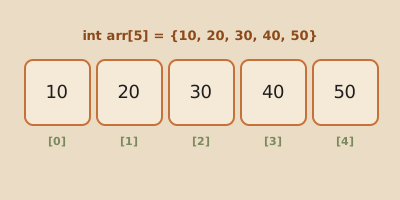
int numeros[5] = {10, 20, 30, 40, 50};That means exactly this:
numeros[0] = 10numeros[1] = 20numeros[2] = 30numeros[3] = 40numeros[4] = 50
Accessing elements
To read or use a value from the array, we write the array name and the index in brackets.
int primero = numeros[0];
int tercero = numeros[2];
Complete example with position access
#include <stdio.h>

int main() {
    int edades[4] = {15, 18, 20, 22};

    printf("Age at position 0: %d\n", edades[0]);
    printf("Age at position 1: %d\n", edades[1]);
    printf("Age at position 2: %d\n", edades[2]);
    printf("Age at position 3: %d\n", edades[3]);

    return 0;
}
Modifying an array element
Array values can also change.
#include <stdio.h>

int main() {
    int notas[3] = {6, 7, 8};

    printf("Before: %d\n", notas[1]);

    notas[1] = 10;

    printf("After: %d\n", notas[1]);

    return 0;
}
One-dimensional array
A one-dimensional array is the simplest array.
It has one dimension and can be imagined as a row of elements.
[10, 20, 30, 40, 50]Or more visually:
Index:   0    1    2    3    4
Value:   10   20   30   40   50
Example with float
#include <stdio.h>

int main() {
    float precios[3] = {1250.5, 980.0, 1500.75};

    printf("Price 1: %.2f\n", precios[0]);
    printf("Price 2: %.2f\n", precios[1]);
    printf("Price 3: %.2f\n", precios[2]);

    return 0;
}
This shows something important:
an array doesn’t always have to be of integers. It can be of any type, as long as all its elements are the same type.
Loading data into an array with a loop
One of the great advantages of arrays is that they combine very well with repetitive structures.
#include <stdio.h>

int main() {
    int numeros[5];
    int i;

    for (i = 0; i < 5; i = i + 1) {
        printf("Enter a number: ");
        scanf("%d", &numeros[i]);
    }

    printf("\nStored values:\n");

    for (i = 0; i < 5; i = i + 1) {
        printf("numeros[%d] = %d\n", i, numeros[i]);
    }

    return 0;
}
What’s good about this example?
So much.
Because it shows you don’t need to write:
scanf("%d", &numeros[0]);
scanf("%d", &numeros[1]);
scanf("%d", &numeros[2]);
That would be repetitive and awkward. With a loop, we work through all positions in an orderly way.
Multidimensional arrays
A multidimensional array is an array with more than one dimension.
The most common case when starting to program is the two-dimensional array, also called a matrix.
What is a matrix?
A matrix organizes data into:
- rows
- columns
So instead of imagining a single row of lockers, we imagine a table.
Declaring a matrix
int matriz[2][3];This means:
- 2 rows
- 3 columns
In other words, there’s room for 6 integers total.
Mental picture of a matrix
       Column 0  Column 1  Column 2
Row 0     [ ]        [ ]        [ ]
Row 1     [ ]        [ ]        [ ]
Initializing a matrix
int matriz[2][3] = {
    {1, 2, 3},
    {4, 5, 6}
};
This means:
matriz[0][0] = 1matriz[0][1] = 2matriz[0][2] = 3matriz[1][0] = 4matriz[1][1] = 5matriz[1][2] = 6
Accessing a matrix element
To access an element in a matrix we need two indices:
- one for the row
- another for the column
int valor = matriz[1][2];That value is 6.
Why?
Because:
- row
1is the second row - column
2is the third column
Complete matrix example
#include <stdio.h>

int main() {
    int matriz[2][3] = {
        {1, 2, 3},
        {4, 5, 6}
    };

    printf("matriz[0][0] = %d\n", matriz[0][0]);
    printf("matriz[0][2] = %d\n", matriz[0][2]);
    printf("matriz[1][1] = %d\n", matriz[1][1]);
    printf("matriz[1][2] = %d\n", matriz[1][2]);

    return 0;
}
Modifying a position in a matrix
We can also change a value in the matrix.
#include <stdio.h>

int main() {
    int tablero[2][2] = {
        {1, 0},
        {0, 1}
    };

    tablero[0][1] = 9;

    printf("New value: %d\n", tablero[0][1]);

    return 0;
}
What are multidimensional arrays used for?
They’re useful when data has a table-like organization.
For example:
- grades of several students in several subjects
- seats in a room
- game board
- mathematical matrices
- temperatures by day and shift
Conceptual example: grades by student and subject
int notas[3][2];Could mean:
- 3 students
- 2 subjects
So:
notas[0][0]= grade of student 1 in subject 1notas[0][1]= grade of student 1 in subject 2notas[1][0]= grade of student 2 in subject 1- and so on
Difference between one-dimensional and multidimensional arrays
One-dimensional
It has a single line of positions.
int numeros[5];It’s accessed with a single index.
numeros[2]Multidimensional
It has more than one dimension.
int matriz[2][3];It’s accessed with more than one index.
matriz[1][2]Common mistakes
Forgetting that the index starts at 0
This is the classic mistake.
If the array has 5 elements, the last index is 4, not 5.
Accessing a position that doesn’t exist
This is wrong:
int numeros[5];
int x = numeros[5];
Because numeros[5] is outside the array.
Confusing count with last index
If there are 3 rows and 2 columns:
int notas[3][2];the valid rows are:
012
And the valid columns are:
01
Thinking a matrix works the same as a simple array
No. In a matrix you need two indices.
Summary
- an array lets you store several data of the same type
- each element is identified by its index
- in C, the first index is always
0 - a one-dimensional array looks like a row of data
- a two-dimensional array looks like a table with rows and columns
- to access a matrix you need two indices
Final thought
Arrays are one of the first truly powerful tools for working with several related data.
If you understand these three ideas well:
- that data shares a single name
- that each position is identified by an index
- that a matrix adds rows and columns
then you already have a very solid foundation for everything that comes next.