Facundo Uferer
Methods and Functions in Java
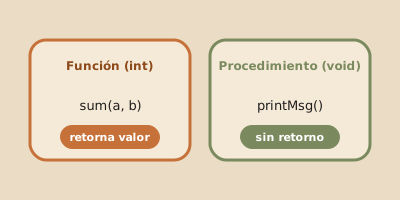
In software development, a method (also referred to as a function or procedure) is a reusable block of code designed to perform a specific task. Modularizing code into methods enforces the DRY (Don’t Repeat Yourself) principle, significantly improving code readability, maintainability, and testability.
In this lesson, you will learn to define methods, handle parameters and return values, master Java’s Pass-by-Value execution model, implement method overloading, and analyze the Call Stack.
1. Method Declaration and Syntax
The general signature of a method in Java consists of the following components:
[modifiers] <return_type> methodName([type param1, type param2, ...]) {
    // Method body
    return value; // (Required if return type is not void)
}
Fundamental Example:
public class MathOperations {

    // Method returning an integer (int):
    public static int multiply(int a, int b) {
        return a * b;
    }

    // Void method (no return value):
    public static void displayMessage(String message) {
        System.out.println("[LOG]: " + message);
    }

    public static void main(String[] args) {
        int result = multiply(6, 7);
        displayMessage("Multiplication result is: " + result);
    }
}
2. The Call Stack and Parameter Passing
When a Java application runs, the JVM manages a dedicated memory area called the Stack. Every time a method is called, the JVM pushes a Stack Frame storing its local variables and parameters.
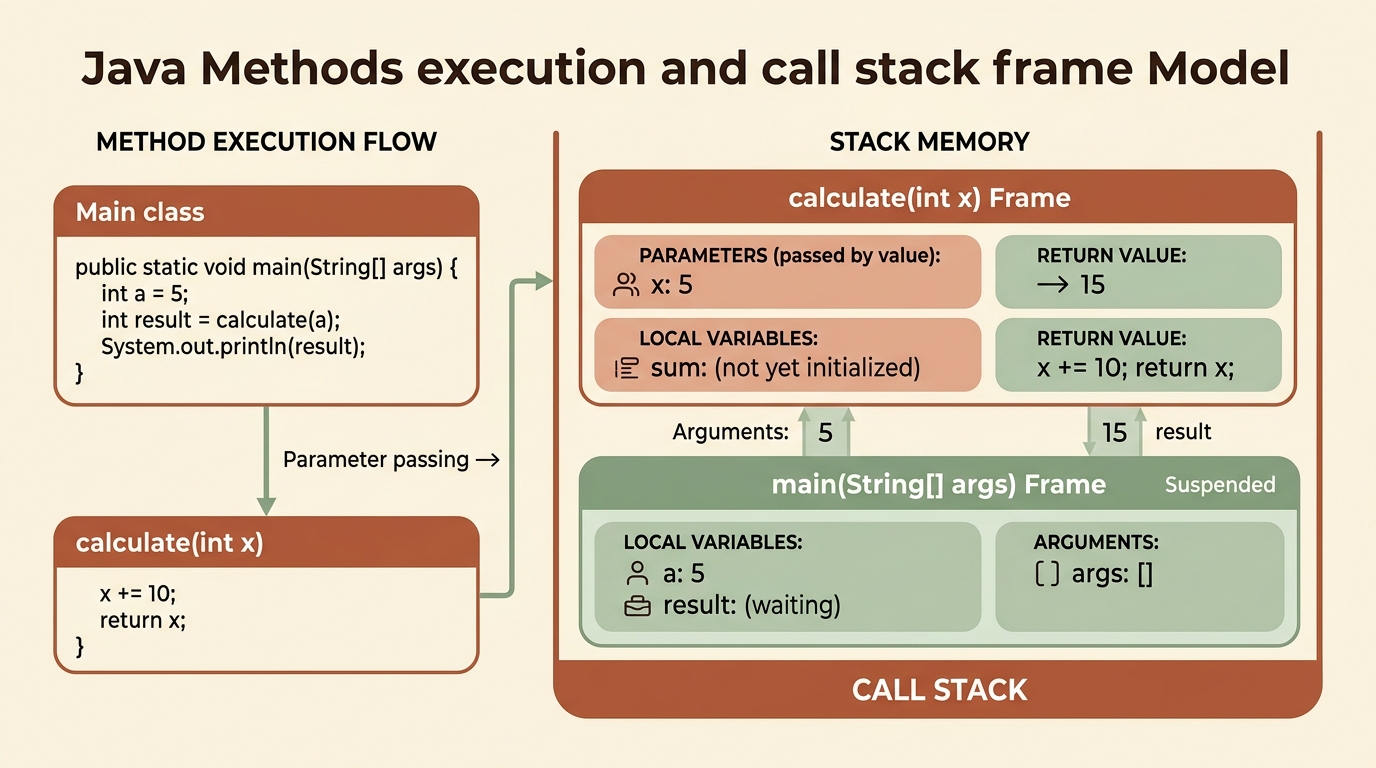
Core Rule: Java is Strictly Pass-by-Value
In Java, pure pass-by-reference does not exist. Arguments are always passed by copying their value:
-
For Primitive Types (
int,double,boolean, etc.): A copy of the literal value is passed. Modifying the parameter inside the method does not alter the caller’s original variable. -
For Objects and Arrays: A copy of the reference value (memory address) is passed. The method can mutate internal state/properties of the object, but cannot reassign the caller’s reference variable to point to a new object.
Code Demonstration:
public class PassByValueDemo {

    public static void main(String[] args) {
        int x = 10;
        modifyPrimitive(x);
        System.out.println("x in main: " + x); // Still 10

        int[] numbers = {1, 2, 3};
        modifyArray(numbers);
        System.out.println("numbers[0] in main: " + numbers[0]); // Changed to 99
    }

    public static void modifyPrimitive(int number) {
        number = 500; // Modifies local copy inside the Stack Frame only
    }

    public static void modifyArray(int[] arr) {
        arr[0] = 99; // Mutates Heap object pointed by copied reference
    }
}
3. Method Overloading
Method Overloading allows defining multiple methods with the same name within the same class, provided they have different signatures (different parameter count, types, or order).
The JVM determines which method to execute at compile-time based on invocation arguments:
public class Calculator {

    // 1. Sum of two integers
    public static int add(int a, int b) {
        return a + b;
    }

    // 2. Sum of three integers (different parameter count)
    public static int add(int a, int b, int c) {
        return a + b + c;
    }

    // 3. Sum of two double values (different parameter types)
    public static double add(double a, double b) {
        return a + b;
    }

    public static void main(String[] args) {
        System.out.println(add(5, 10));        // Calls version 1 (int, int)
        System.out.println(add(5, 10, 15));    // Calls version 2 (int, int, int)
        System.out.println(add(3.5, 2.5));     // Calls version 3 (double, double)
    }
}
4. Static (static) vs Instance Methods
So far, we have declared our methods using the static keyword.
- Static Methods (
static):- Belong to the class itself.
- Can be invoked directly as
ClassName.methodName()without instantiating objects withnew. - Ideal for pure mathematical functions or utility helpers (e.g.
Math.max(),Math.sqrt()).
- Instance Methods (without
static):- Belong to specific object instances created from the class.
- Can access object internal state and fields (covered in OOP module).
5. Introduction to Recursion
A method is recursive when it calls itself within its body to solve a problem by breaking it into smaller subproblems.
Every recursive method requires two mandatory components:
- Base Case: Stopping condition that halts recursion to prevent a
StackOverflowError. - Recursive Case: Self-invocation reducing the problem closer to the base case.
Classic Example: Factorial of $n$ ($n!$)
public class RecursionDemo {

    public static long factorial(int n) {
        // 1. Base Case
        if (n <= 1) {
            return 1;
        }
        // 2. Recursive Case
        return n * factorial(n - 1);
    }

    public static void main(String[] args) {
        System.out.println("Factorial of 5: " + factorial(5)); // Output: 120
    }
}
This introductory factorial version illustrates the structure, but it treats negative values as a base case and can overflow long. It should not be exposed as an API without validating and bounding the input, as the next example does.
Forms of recursion
- Direct recursion: a method calls itself, as
factorialdoes. - Indirect recursion or mutual recursion: one method calls another that eventually calls the first one again. They must share a coherent termination condition.
- Tail recursion: the recursive call is the method’s final operation; no calculation remains after it returns.
static boolean isEven(int n) {
    if (n < 0) return false; // invalid n: documented sentinel value
    if (n == 0) return true;
    return isOdd(n - 1); // Indirect recursion
}

static boolean isOdd(int n) {
    if (n < 0) return false; // invalid n: documented sentinel value
    if (n == 0) return false;
    return isEven(n - 1); // Mutual recursion
}

static long tailSum(int n, long accumulator) {
    if (n == 0) return accumulator;
    return tailSum(n - 1, accumulator + n); // Tail recursion
}
Even though tailSum has tail form, Java does not guarantee tail-call optimization. Every call may retain its frame. A depth of n consumes O(n) stack space and can cause StackOverflowError; placing the call last does not make it safe.
Validated and bounded recursive example
The following method accepts only a known depth. The limit is part of the contract, not a promise that every JVM supports exactly that many frames:
public final class RecursiveSum {
    private static final int MAX_RECURSIVE_DEPTH = 1_000;

    public static long sumTo(int n) {
        if (n < 0) {
            System.out.println("n cannot be negative");
            return -1; // documented sentinel value: no valid sum is negative
        }
        if (n > MAX_RECURSIVE_DEPTH) {
            System.out.println("n exceeds recursive limit: " + MAX_RECURSIVE_DEPTH);
            return -1;
        }
        if (n == 0) {
            return 0; // Base case
        }
        return n + sumTo(n - 1); // Direct recursion
    }
}
The base case covers 0, every call reduces n, and validation rejects values outside the domain or above the bound. Time is O(n) and additional stack space is also O(n).
When iteration is safer
Use recursion when the problem is naturally recursive—such as trees, divide and conquer, or backtracking—and depth is bounded or controlled. Prefer a loop or an explicit stack when:
- input may be very large or comes from an untrusted source;
- the problem is a linear sequence such as counting, summing, or scanning an array;
- you need predictable memory consumption;
- you cannot prove that each call advances toward a base case.
An iterative sum uses O(1) additional memory and avoids depending on stack size. Recursion is not “more advanced” than a loop: it is a tool with a concrete cost.
6. Guided Hands-on Exercise
Challenge: Utility Statistics Library
Write a Java class named StatUtils.java containing:
- Overloaded
average(int[] numbers)andaverage(double[] numbers)methods. - An
getMax(int[] numbers)method returning the maximum value. - A
printSummary(String title, double result)method formatting output.
View Suggested Solution
public class StatUtils {

    public static double average(int[] numbers) {
        double sum = 0;
        for (int num : numbers) {
            sum += num;
        }
        return numbers.length > 0 ? sum / numbers.length : 0;
    }

    public static double average(double[] numbers) {
        double sum = 0;
        for (double num : numbers) {
            sum += num;
        }
        return numbers.length > 0 ? sum / numbers.length : 0;
    }

    public static int getMax(int[] numbers) {
        int max = numbers[0];
        for (int num : numbers) {
            if (num > max) {
                max = num;
            }
        }
        return max;
    }

    public static void printSummary(String title, double result) {
        System.out.println("----------------------------------------");
        System.out.println(" " + title + ": " + result);
        System.out.println("----------------------------------------");
    }

    public static void main(String[] args) {
        int[] scores = {8, 9, 10, 7, 9};
        double avg = average(scores);
        int maxScore = getMax(scores);

        printSummary("Average Score", avg);
        printSummary("Maximum Score", maxScore);
    }
}