Facundo Uferer
Exception Handling and Robustness
Back in the Constructors, Access Modifiers, and Getters/Setters lesson you wrote this:
public boolean setPrice(double price) {
    if (price < 0) {
        return false;
    }
    this.price = price;
    return true;
}
It works, but it has a crack: setPrice returns a boolean to signal whether it accepted or rejected the value, but nothing forces the caller to check that result.
product.setPrice(-500); // compiles, runs, and the rejection goes completely unnoticedThe price stays as it was, there is no warning, and the program keeps running as if nothing happened. This lesson fixes exactly that crack: a way to fail that cannot be ignored by accident.
A real program fails constantly, and not because of you: the file is missing, the network drops, the user types "twenty-two" where a number belongs, the database refuses the connection. The question is not whether it will fail, but what your code does when it does.
Java has a very concrete answer: when something goes wrong, an object is thrown describing the problem, and normal execution stops until somebody catches it and decides what to do. Unlike a boolean you can let slide unchecked, an exception nobody catches stops the program: there is no way to pretend nothing happened.
1. An exception is an object
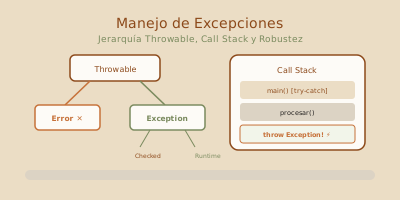
This is the first thing to get out of the way: an exception is not an error code or some magical state. It is an instance of a class, with its inheritance hierarchy, its fields, and its methods — exactly like everything else you have been studying.
Like any object, an exception carries useful information:
catch (ArithmeticException e) {
    e.getMessage();       // "/ by zero" — the description
    e.getCause();         // the original exception, if this one wraps it
    e.getStackTrace();    // the full call trail
    e.printStackTrace();  // prints it to the error stream
}
2. try, catch, finally and the order they run in
try {
    // the code that may fail
} catch (SomeException e) {
    // what to do if it fails that particular way
} finally {
    // what must happen no matter what
}try lines after the failure never execute. That is the most common misreading of a long try block.That detail about the try being cut short matters more than it looks:
try {
    System.out.println("A");
    int x = 10 / 0;              // ← thrown here
    System.out.println("B");     // ← NEVER runs
} catch (ArithmeticException e) {
    System.out.println("C");
}
System.out.println("D");

// Output: A, C, D
That is why try blocks should be short. A forty-line try is a block where you cannot tell what state things were left in when the exception fired.
3. Checked vs unchecked: who forces your hand
This distinction is unique to Java and it shapes how everything else gets written.
Unchecked (RuntimeException and its descendants): they represent programming errors. A NullPointerException is not handled, it is prevented. The compiler stays quiet because the fix is not a catch, it is fixing the code.
String s = null;
s.length();                  // NullPointerException — the bug is the null, not the exception
int[] a = new int[3];
a[5] = 1;                    // ArrayIndexOutOfBoundsException — the bug is the 5
Integer.parseInt("hello");   // NumberFormatException — validate the input first
Checked (an Exception that is not a RuntimeException): they represent expected environmental conditions your code does not control. An external service may not respond; that is not your bug, that is reality. The compiler forces you to decide.
Imagine a getConfiguration() method that queries an external service, and therefore declares throws ConfigurationUnavailableException — a checked exception, because the service may not be available and whoever calls it has to decide what to do.
And there are only two options. Handle it:
public void loadConfiguration() {
    try {
        String value = getConfiguration();
        System.out.println(value);
    } catch (ConfigurationUnavailableException e) {
        System.out.println("Could not read configuration, falling back to defaults.");
    }
}
Or declare that you are not taking responsibility, and let your caller deal with it:
public String loadConfiguration() throws ConfigurationUnavailableException {
    return getConfiguration();   // let the caller decide
}
throw(throwing, inside the method) andthrows(declaring, in the signature) are different things spelled almost identically. It is a classic source of confusion:throwis an action,throwsis a warning.
4. Propagation: how an exception travels
When an exception is thrown and the current method does not catch it, it is not lost: the JVM abandons that method and offers the exception to whoever called it, and so on down the stack.
This has an enormous design consequence: you do not catch where the error happens, you catch where you can do something about it. A method that reads a file almost never knows what to do if it is missing; the one that does know is whoever asked for the read.
A catch that cannot make any useful decision is a catch that should not be there.
5. Multiple catch blocks, and order matters
try {
    process(data);
} catch (NumberFormatException e) {       // most specific first
    System.out.println("The value is not a valid number.");
} catch (IllegalArgumentException e) {    // NumberFormatException extends this one
    System.out.println("Invalid argument.");
} catch (Exception e) {                   // the broadest, last
    System.out.println("Unexpected error.");
}
Java tries the catch blocks in order and runs the first whose type matches. That is why they go from most specific to most general. Invert the order and the compiler stops you outright: the later blocks would be unreachable.
When two different types are handled the same way, do not duplicate the block — use multi-catch.
try {
    connectAndSave();
} catch (IOException | SQLException e) {
    logger.error("Persistence failed: " + e.getMessage());
}
6. try-with-resources: the close you cannot forget
When you open a file, a connection, or a socket, you have to close it. Always. Including — especially — when something fails midway.
Files arrive later on, in the Files, Serialization, and JAR Packaging lesson. To see the closing mechanism without depending on them yet, we are going to simulate a resource with a class of our own that implements the AutoCloseable interface — the same notion of interface you saw in Abstract Classes, Interfaces, and Code Organization — it prints a message when it opens and another when it closes, so you can see the exact order everything happens in.
public class SimulatedConnection implements AutoCloseable {
    private final String server;

    public SimulatedConnection(String server) {
        if (server == null || server.isBlank()) {
            throw new IllegalArgumentException("The server cannot be blank");
        }
        this.server = server;
        System.out.println("Connecting to " + server + "...");
    }

    public void send(String command) {
        System.out.println("Sending: " + command);
    }

    @Override
    public void close() {
        System.out.println("Connection to " + server + " closed.");
    }
}
Doing it by hand looks like this:
SimulatedConnection connection = null;
try {
    connection = new SimulatedConnection("data-server");
    connection.send("SELECT * FROM products");
} catch (IllegalArgumentException e) {
    System.out.println("Could not connect.");
} finally {
    if (connection != null) {      // what if constructing it failed?
        try {
            connection.close();    // closing can throw too
        } catch (Exception e) {
            // and here almost nobody knows what to write
        }
    }
}
Nine lines of ceremony, two edge cases most people forget, and we still have not done anything useful. That is why try-with-resources exists:
try (SimulatedConnection connection = new SimulatedConnection("data-server")) {
    connection.send("SELECT * FROM products");
} catch (IllegalArgumentException e) {
    System.out.println("Could not connect.");
}
// connection is already closed, whatever happenedclose() because you are not the one writing it.7. Custom exceptions
When the problem belongs to your domain, the standard exceptions describe it poorly. IllegalStateException is correct but mute; InsufficientFundsException tells you what happened from its name alone.
// Unchecked: the caller could have prevented it by checking the balance first
public class InsufficientFundsException extends RuntimeException {
    private final double shortfall;

    public InsufficientFundsException(double requested, double available) {
        super(String.format("Short by $%.2f: $%.2f requested, $%.2f available",
              requested - available, requested, available));
        this.shortfall = requested - available;
    }

    public double getShortfall() { return shortfall; }
}
Notice the exception carries data, not just text. The catch block can use it:
catch (InsufficientFundsException e) {
    System.out.printf("You are $%.2f short. Want to top up?%n", e.getShortfall());
}
Checked or unchecked?
The question that decides it: can whoever calls this method do something reasonable to recover?
- Yes, and it is an expected environmental condition →
extends Exception(checked). Example:ConfigurationFileNotFound. - No, or it is an API misuse →
extends RuntimeException(unchecked). Example:InvalidAgeException, because the caller should have validated first.
In practice most modern code leans unchecked, because checked exceptions force throws to propagate through the entire call chain, and that ends up polluting the signatures of methods that have nothing to do with the problem.
Chaining causes
When you translate a low-level exception into one from your domain, never lose the original:
try {
    return repository.findById(id);
} catch (SQLException e) {
    // The second argument is the cause: it preserves the full stack trace
    throw new RepositoryUnavailableException("Could not query customer " + id, e);
}
Without that e, the stack trace is truncated exactly where the information you needed for debugging lived. It is one of the most expensive mistakes in hours lost.
8. The four antipatterns
1. The empty catch. The worst of them, no contest:
try {
    saveOrder(order);
} catch (Exception e) {
    // TODO: look into this later
}
The order was not saved, the user sees “done”, and there is not a single trace in any log. A swallowed error is infinitely worse than a visible one.
2. Catching Exception right away. It catches everything, including the programming bugs you wanted to blow up loudly and early. Catch the most specific type you actually know how to handle.
3. Exceptions for normal control flow. A user not existing is not exceptional, it is Tuesday:
// Bad: uses an exception for something that happens every day
try {
    User u = findUser(email);
    show(u);
} catch (UserNotFoundException e) {
    showSignupForm();
}

// Good: null expresses "may be absent" with no exception at all
User u = findUser(email);
if (u != null) {
    show(u);
} else {
    showSignupForm();
}
Beyond confusing the reader, throwing exceptions is expensive: constructing one captures the entire stack trace.
4. return inside finally. It silently discards the exception that was travelling:
try {
    throw new IllegalStateException("something serious");
} finally {
    return 0;   // the exception VANISHES. Nobody ever finds out.
}
9. Common mistakes
| Mistake | What happens | How to fix it |
|---|---|---|
Empty catch | The failure disappears without a trace and the bug shows up much later, unrecognizable. | At minimum, log it. If it really is ignored on purpose, write that down in a comment. |
catch (Exception e) as the first catch | It also traps the programming bugs that should have blown up. | Catch the most specific type you know how to handle. |
| Putting the general catch before the specific one | Compile error: the second catch is unreachable. | Order from most specific to most general. |
Rethrowing without the cause: throw new MyException(e.getMessage()) | The original stack trace is lost, and with it the line that actually failed. | throw new MyException("context", e). |
A fifty-line try block | Impossible to know what state things were in when the exception fired. | Short try blocks, wrapped around the operation that can fail. |
Closing resources by hand in finally | Nesting, null checks, and a close() that can also fail. | try-with-resources. |
| Using exceptions for ordinary cases | Confusing and slow code: every exception captures the whole stack trace. | A checkable return value (null, a boolean), or validating up front. |
10. Guided hands-on exercise
Challenge: age validation
- Create an
InvalidAgeExceptionextendingRuntimeExceptionthat stores the rejected age and builds a descriptive message. - Create a
PersonRegistryclass with aregister(String name, int age)method that throws it when the age is outside 0–120. - Add a
registerFromText(String name, String ageText)method that parses the text and translates theNumberFormatExceptioninto your own exception, preserving the cause. - In
main, try a valid case, an out-of-range age, and a text that is not a number. Catch each one and print a useful message. - Use a
finallyblock to record that the registration attempt finished, successfully or not.
See suggested solution
public class InvalidAgeException extends RuntimeException {
    private final int rejectedAge;

    public InvalidAgeException(int rejectedAge) {
        super("Invalid age: " + rejectedAge + ". It must be between 0 and 120.");
        this.rejectedAge = rejectedAge;
    }

    // Constructor with a cause: to wrap another exception without losing it
    public InvalidAgeException(String message, Throwable cause) {
        super(message, cause);
        this.rejectedAge = -1;
    }

    public int getRejectedAge() { return rejectedAge; }
}

public class PersonRegistry {
    private static final int MIN_AGE = 0;
    private static final int MAX_AGE = 120;

    public void register(String name, int age) {
        if (name == null || name.isBlank()) {
            throw new IllegalArgumentException("Name is required");
        }
        if (age < MIN_AGE || age > MAX_AGE) {
            throw new InvalidAgeException(age);
        }
        System.out.println("  ✓ Registered: " + name + ", age " + age);
    }

    public void registerFromText(String name, String ageText) {
        int age;
        try {
            age = Integer.parseInt(ageText.trim());
        } catch (NumberFormatException e) {
            // Translate into OUR domain language, without losing the cause
            throw new InvalidAgeException(
                "'" + ageText + "' is not a valid number for an age", e);
        }
        register(name, age);   // the range validation lives in exactly one place
    }
}

public class MainRegistry {
    public static void main(String[] args) {
        PersonRegistry registry = new PersonRegistry();

        String[][] attempts = {
            {"Laura Gimenez", "28"},      // valid
            {"Carlos Ruiz",   "150"},     // out of range
            {"Ana Torres",    "thirty"}   // not a number
        };

        for (String[] attempt : attempts) {
            System.out.println("Trying to register " + attempt[0] + "...");
            try {
                registry.registerFromText(attempt[0], attempt[1]);
            } catch (InvalidAgeException e) {
                System.out.println("  ✗ " + e.getMessage());
                if (e.getCause() != null) {
                    // The original cause stays available for the technical log
                    System.out.println("    technical cause: " + e.getCause());
                }
            } catch (IllegalArgumentException e) {
                System.out.println("  ✗ Invalid data: " + e.getMessage());
            } finally {
                System.out.println("  — attempt finished —\n");
            }
        }
    }
}
Three design decisions worth looking at here.
InvalidAgeException is unchecked because the caller can validate the age beforehand: it is a usage error, not an environmental condition.
registerFromText translates the technical NumberFormatException into a domain exception, but passes e as the cause. The full stack trace remains available; only the language the problem is told in changes.
And register is the single place where the range rule lives. registerFromText parses and delegates. It is the same principle as the canonical constructor from the Constructors, Access Modifiers, and Getters/Setters lesson.
Key takeaways
- An exception is an object with a hierarchy, data, and a stack trace. It is not an error code.
- Unchecked (
RuntimeException) = programming error: prevent it, do not handle it. Checked = environmental condition: the compiler forces you to decide. - The
tryblock is cut short at the failing line;finallyalways runs, even with areturnin the mix. - The exception travels up the stack until it finds a
catch. Catch where you can act, not where it happens. - Order
catchblocks from most specific to most general, and use multi-catch instead of duplicating blocks. try-with-resourcesfor anything that opens and closes. No exceptions.- When rethrowing, always pass the cause: without it you lose the line that actually failed.
- An empty
catchis worse than not catching at all.