Facundo Uferer
Java Collections and Generics (JCF)
In the next lessons you are going to implement lists, stacks, and queues by hand, to understand exactly how they work inside. Before you get there, here is the good news: day to day, none of this needs to be written from scratch. Java ships all of it, tuned over thirty years and battle-tested by millions of applications.
But look at what you gained: when somebody says “use a HashMap”, you now know there is an array and a collision mechanism inside. When you see LinkedList, you know why reaching element 500 is slow. That is the difference between using a tool and understanding it.
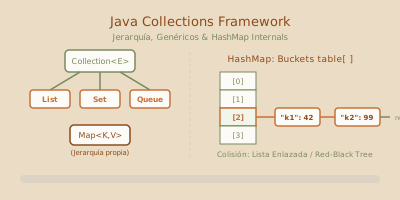
1. The Java Collections Framework hierarchy
That last sentence is a concrete rule, not advice:
// Good: the variable's type is the interface
List<String> names = new ArrayList<>();
Map<String, Integer> stock = new HashMap<>();

// Bad: you tie yourself to the implementation
ArrayList<String> names = new ArrayList<>();
With the first form, switching to LinkedList means changing one word. With the second, if anyone used an ArrayList-specific method, it means changing everything. It is the same principle you will formalize later as an ADT (Abstract Data Type) — program against the specification, not the implementation — applied here to the standard library.
2. Generics: the problem they came to solve
Before Java 5, collections stored Object. Everything compiled, and errors surfaced once the program was already in production.
With generics the compiler also knows what comes out of the collection, so the cast disappears:
List<String> names = new ArrayList<>();
names.add("Laura");
String first = names.get(0);   // no cast: the compiler knows it is a String
The empty <> on the right is called the diamond and tells the compiler “the same type I declared on the left”. Writing new ArrayList<String>() is not wrong, just redundant.
3. The four families, and when to use each
List — insertion order, duplicates allowed
List<String> tasks = new ArrayList<>();
tasks.add("Study OOP");
tasks.add("Practice lists");
tasks.add("Study OOP");        // repeats, and that is fine

System.out.println(tasks.get(1));      // access by index
System.out.println(tasks.size());      // 3
Set — no duplicates, and order depends on the implementation
Set<String> tags = new HashSet<>();
tags.add("java");
tags.add("oop");
tags.add("java");               // ignored, already present

System.out.println(tags.size());    // 2
HashSet guarantees no order at all. LinkedHashSet preserves insertion order. TreeSet keeps elements sorted and gives you operations like first(), last(), and headSet().
Careful: for a HashSet to detect duplicates of your own classes, those classes must implement equals() and hashCode() correctly. Without that, two identical objects both get in. That is the core topic of the next lesson.
Map — associating a key with a value
It is the most used collection of all, and the most under-used:
Map<String, Integer> stock = new HashMap<>();
stock.put("tea", 12);
stock.put("coffee", 5);
stock.put("tea", 20);              // overwrites: keys are unique

System.out.println(stock.get("tea"));               // 20
System.out.println(stock.get("sugar"));             // null — not there
System.out.println(stock.getOrDefault("sugar", 0)); // 0 — much better

// Walking a Map:
for (Map.Entry<String, Integer> entry : stock.entrySet()) {
    System.out.println(entry.getKey() + " → " + entry.getValue());
}
The modern Map methods eliminate almost every if people used to write by hand:
// Instead of: if (!map.containsKey(k)) map.put(k, new ArrayList<>());
map.computeIfAbsent(key, k -> new ArrayList<>()).add(value);

// Instead of: counter.put(w, counter.containsKey(w) ? counter.get(w) + 1 : 1);
counter.merge(word, 1, Integer::sum);

// Instead of: if (map.get(k) == null) map.put(k, v);
map.putIfAbsent(key, value);
Queue / Deque — processing order
You will implement them by hand later, in the Stack and Queue ADTs lesson, but you can already use them today: ArrayDeque for stacks and queues; PriorityQueue when the next item out is not the one that arrived first but the highest-priority one.
4. How a HashMap works inside
This explains once and for all why get() is O(1) and why equals/hashCode matter so much.
get() is arithmetic. With a bad hash everything lands in one bucket and the map degenerates into a list: O(n).That last sentence in the caption is the reason the next lesson exists. A badly implemented hashCode() breaks no compilation and throws no exception: it just makes your HashMap a hundred times slower, or makes it fail to find what you stored.
5. Writing your own generics
They are not only for consuming; you can write them too. A generic class declares its type parameters between <>:
public class Box<T> {
    private T content;

    public void put(T content) { this.content = content; }
    public T take() { return content; }
}

Box<String> textBox = new Box<>();
textBox.put("hello");
String s = textBox.take();   // no cast
A generic method declares its own type parameter before the return type:
public static <T> T first(List<T> list) {
    if (list.isEmpty()) throw new NoSuchElementException("Empty list");
    return list.get(0);
}
And you can bound the type with extends, so you can call methods of the bound:
// T must be comparable, so we can call compareTo
public static <T extends Comparable<T>> T max(List<T> list) {
    T largest = list.get(0);
    for (T item : list) {
        if (item.compareTo(largest) > 0) largest = item;
    }
    return largest;
}
By convention type parameters are single uppercase letters: T (type), E (element), K and V (key, value), R (result).
Type erasure: the fine print
Generics exist only at compile time. The JVM knows nothing about them: in bytecode, List<String> and List<Integer> are the same thing. This is called type erasure, and it explains limitations that otherwise look arbitrary:
List<String> a = new ArrayList<>();
List<Integer> b = new ArrayList<>();
System.out.println(a.getClass() == b.getClass());   // true — the same class

// T[] array = new T[10];   // not allowed: at runtime nobody knows what T is
6. Which one to pick
| I need… | I use |
|---|---|
| Insertion order and index access | ArrayList |
| Heavy insert and delete at the ends | ArrayDeque |
| Unique elements, order irrelevant | HashSet |
| Unique elements, always sorted | TreeSet |
| Key → value, blazing fast access | HashMap |
| Key → value, iteration in key order | TreeMap |
| Key → value, in insertion order | LinkedHashMap |
| Always take the highest-priority item | PriorityQueue |
7. Common mistakes
| Mistake | What happens | How to fix it |
|---|---|---|
Declaring ArrayList<T> x = new ArrayList<>() | You tie yourself to the implementation, and changing it forces edits everywhere it is used. | Declare with the interface: List<T> x = new ArrayList<>(). |
Using your own objects in HashSet/HashMap without equals/hashCode | Duplicates get stored and get() returns null with the correct key. | Implement both consistently (Iterators, Ordering, and the equals/hashCode Contract). |
| Modifying a collection while walking it with for-each | ConcurrentModificationException. | Iterator.remove() or removeIf() (Iterators, Ordering, and the equals/hashCode Contract). |
map.get(k) without handling null | NullPointerException unboxing an Integer that came back null. | getOrDefault(k, defaultValue). |
Using LinkedList “because inserting is faster” | In practice it is slower than ArrayList because of cache misses. | ArrayList unless you measure and prove otherwise. |
Using a mutable key in a HashMap | If the object changes, its hashCode changes and it is lost in the old bucket. | Immutable keys: String, Integer, or classes with final fields. |
Trying to modify a List.of(...) list | UnsupportedOperationException: it is immutable. | new ArrayList<>(List.of(...)) when you need to modify it. |
8. Guided hands-on exercise
Challenge: a word frequency counter
Write a program that takes a text and reports how many times each word appears.
- Normalize the text: all lowercase, no punctuation.
- Count frequencies with a
Map<String, Integer>. - Print the result sorted by frequency descending and, on ties, alphabetically.
- Also report how many distinct words there are, using a
Set. - Ignore stop words (
the,and,of,a,in…).
See suggested solution
import java.util.*;

public class WordCounter {

    private static final Set<String> STOP_WORDS = Set.of(
        "the", "and", "of", "a", "in", "to", "is", "it", "that", "with", "on", "an"
    );

    public static Map<String, Integer> count(String text) {
        Map<String, Integer> frequencies = new HashMap<>();

        // \\p{L}+ takes runs of letters, accented ones included
        for (String word : text.toLowerCase().split("[^\\p{L}]+")) {
            if (word.isBlank() || STOP_WORDS.contains(word)) {
                continue;
            }
            // merge: if absent, store 1; if present, apply Integer::sum
            frequencies.merge(word, 1, Integer::sum);
        }
        return frequencies;
    }

    public static void main(String[] args) {
        String text = """
            Object oriented programming organizes the software in objects.
            Each object combines state and behavior, and the state of an object
            is protected with encapsulation. Inheritance and polymorphism let
            the software grow without rewriting the software that already works.
            """;

        Map<String, Integer> frequencies = count(text);

        // A Set gives us the distinct words with no logic written at all
        Set<String> distinct = frequencies.keySet();
        System.out.println("Distinct words (stop words excluded): " + distinct.size());
        System.out.println("Total occurrences: " +
            frequencies.values().stream().mapToInt(Integer::intValue).sum());
        System.out.println();

        // Sort: frequency descending first, then alphabetically
        List<Map.Entry<String, Integer>> sorted = new ArrayList<>(frequencies.entrySet());
        sorted.sort(
            Map.Entry.<String, Integer>comparingByValue().reversed()
                .thenComparing(Map.Entry.comparingByKey())
        );

        System.out.println("Top 8:");
        for (Map.Entry<String, Integer> e : sorted.subList(0, Math.min(8, sorted.size()))) {
            System.out.printf("  %-16s %s%n", e.getKey(), "▮".repeat(e.getValue()) + " " + e.getValue());
        }

        // Bonus: group words by length, with computeIfAbsent
        Map<Integer, List<String>> byLength = new TreeMap<>();
        for (String word : distinct) {
            byLength.computeIfAbsent(word.length(), k -> new ArrayList<>()).add(word);
        }
        System.out.println("\n10-letter words: " + byLength.getOrDefault(10, List.of()));
    }
}
Three things to look at here.
frequencies.merge(word, 1, Integer::sum) replaces the classic if (map.containsKey(w)) map.put(w, map.get(w) + 1); else map.put(w, 1);. One line instead of four, with no chance of botching the first-occurrence case.
byLength.computeIfAbsent(len, k -> new ArrayList<>()).add(word) is the pattern for building a map of lists. Without it you would check whether the list exists before appending, on every single iteration.
And STOP_WORDS is a Set, not a List, because the only thing we do with it is ask contains. On a Set that is O(1); on a List it would be O(n), executed once per word in the text. Choosing the right collection is a performance decision, not a style one.
Key takeaways
- The JCF separates interfaces (the ADT) from implementations. Always declare with the interface.
Mapdoes not extendCollection: it holds associations, not standalone elements.- Generics speed up nothing: they move the error forward, from production to the moment you type the line.
- Type erasure means generics do not exist at runtime. That is where their limitations come from.
- In a
HashMap,hashCode()picks the bucket andequals()picks the element inside the bucket. - A bad
hashCode()throws no exception: it just makes you unable to find what you stored. merge,computeIfAbsent,getOrDefault, andputIfAbsentremove most of theifblocks around a map.- Picking the right collection is a performance decision:
containson aSetis O(1); on aList, O(n).