Facundo Uferer
Database Access with JDBC and Safe SQL
In the Files, Serialization, and JAR Packaging lesson you saved data to files. It works — but try this with a file: find every product with stock below 10, sorted by price, while three other users are writing at the same time.
That is exactly what a relational database does, and why it exists. JDBC is the bridge between your Java code and it.
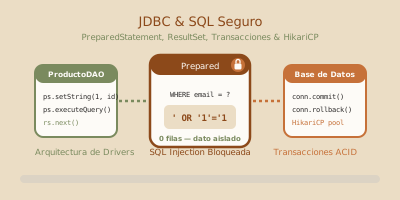
1. The architecture: why there is a layer in between
// The connection: URL, user, password
String url = "jdbc:postgresql://localhost:5432/shop";

try (Connection conn = DriverManager.getConnection(url, "user", "secret")) {
    System.out.println("Connected to " + conn.getMetaData().getDatabaseProductName());
}
Note the try-with-resources from the Exception Handling and Robustness lesson. An unclosed connection is a leaked resource, and with enough of them the database refuses new connections and the whole application goes down.
2. Statement vs PreparedStatement: the world’s most famous vulnerability
This is the most important part of the lesson. Look at this code, which seems harmless:
// NEVER DO THIS
String email = askTheUser();
String sql = "SELECT * FROM users WHERE email = '" + email + "'";
ResultSet rs = statement.executeQuery(sql);PreparedStatement "escapes quotes": it is that the query structure is fixed before the data exists. There is nothing left to escape.// ALWAYS LIKE THIS
String sql = "SELECT id, name, price FROM products WHERE category = ? AND price < ?";
try (PreparedStatement ps = conn.prepareStatement(sql)) {
ps.setString(1, category); // indices start at 1, not 0
ps.setDouble(2, maxPrice);
try (ResultSet rs = ps.executeQuery()) {
while (rs.next()) {
System.out.println(rs.getString("name") + " — $" + rs.getDouble("price"));
}
}
}Beyond security, PreparedStatement gives you two things for free:
- Performance: the database compiles the execution plan once and reuses it for every different value.
- Typing:
setDouble,setDate,setBooleanhandle the formatting. No more fighting date formats inside a SQL string.
Parameter indices start at 1. It is one of the very few things in Java that does not start at zero, and a guaranteed
SQLExceptionthe first time around.
3. Reading results and modifying data
A ResultSet is a cursor: it starts before the first row, and next() advances and returns false when there is nothing left.
List<Product> products = new ArrayList<>();

try (PreparedStatement ps = conn.prepareStatement("SELECT id, name, price, stock FROM products");
     ResultSet rs = ps.executeQuery()) {

    while (rs.next()) {                       // ← without this while, you read nothing
        products.add(new Product(
            rs.getLong("id"),
            rs.getString("name"),
            rs.getDouble("price"),
            rs.getInt("stock")
        ));
    }
}
To modify data you use executeUpdate(), which returns how many rows were affected:
// INSERT, retrieving the id the database generates
String sql = "INSERT INTO products (name, price, stock) VALUES (?, ?, ?)";

try (PreparedStatement ps = conn.prepareStatement(sql, Statement.RETURN_GENERATED_KEYS)) {
    ps.setString(1, "Loose leaf tea");
    ps.setDouble(2, 3200.00);
    ps.setInt(3, 45);

    int rows = ps.executeUpdate();
    System.out.println("Inserted: " + rows);

    try (ResultSet keys = ps.getGeneratedKeys()) {
        if (keys.next()) {
            System.out.println("Assigned id: " + keys.getLong(1));
        }
    }
}

// UPDATE — the WHERE is not optional
try (PreparedStatement ps = conn.prepareStatement(
         "UPDATE products SET stock = stock - ? WHERE id = ? AND stock >= ?")) {
    ps.setInt(1, quantity);
    ps.setLong(2, id);
    ps.setInt(3, quantity);        // the condition prevents negative stock

    if (ps.executeUpdate() == 0) {
        throw new IllegalStateException("Not enough stock, or the product does not exist");
    }
}
Notice that if (executeUpdate() == 0): the return value is information, not noise. An UPDATE affecting zero rows almost always means something did not go as you expected.
4. Transactions: all or nothing
By default JDBC runs in autocommit: every statement is committed on its own, as soon as it runs. For a single operation that is fine. For two that depend on each other, it is a bomb.
Connection conn = getConnection();
try {
    conn.setAutoCommit(false);              // 1. open the transaction

    debit(conn, sourceAccount, amount);
    credit(conn, targetAccount, amount);

    conn.commit();                          // 2. both succeeded: confirm

} catch (SQLException e) {
    conn.rollback();                        // 3. something failed: undo everything
    throw new TransferFailedException("Transfer could not be completed", e);  // see Exception Handling and Robustness
} finally {
    conn.setAutoCommit(true);               // 4. leave the connection as we found it
    conn.close();
}
That finally with setAutoCommit(true) matters more than it looks: if the connection comes from a pool — and in production it always does — the next person to use it inherits whatever configuration you left behind.
5. Connections and pools
Opening a connection is expensive: DNS resolution, TCP handshake, authentication, protocol negotiation. Easily tens of milliseconds. Doing it per query is not viable.
That is why production uses a connection pool: a set of already-open connections that get lent out and returned.
// HikariCP — the de facto standard, and what Spring Boot ships by default
HikariConfig config = new HikariConfig();
config.setJdbcUrl("jdbc:postgresql://localhost:5432/shop");
config.setUsername("user");
config.setPassword("secret");
config.setMaximumPoolSize(10);

DataSource dataSource = new HikariDataSource(config);

// conn.close() does NOT close the connection: it returns it to the pool
try (Connection conn = dataSource.getConnection()) {
    // ...
}
With a pool, close() changes meaning: it returns the connection instead of destroying it. So you keep using try-with-resources exactly as before; it simply does something different underneath.
A
Connectionis not thread-safe. If your application is concurrent — and after the Concurrent Programming: Threads, Synchronization, and Pools lesson you know what that entails — each thread takes its own from the pool and returns it when done. Never share aConnectionacross threads.
6. The DAO pattern
Mixing SQL with business logic gets unmanageable fast. The DAO pattern (Data Access Object) concentrates all data access for an entity in one class:
public interface ProductDAO {                        // the interface: the contract
    Optional<Product> findById(long id);
    List<Product> findByCategory(String category);
    long insert(Product product);
    boolean updateStock(long id, int delta);
    boolean delete(long id);
}
With that interface, the business service does not know whether PostgreSQL, a file, or an in-memory map for tests sits below. It is the same principle as the Abstract Classes, Interfaces, and Code Organization and The List ADT: Static, Dynamic, and Linked lessons: program against the contract.
7. Common mistakes
| Mistake | What happens | How to fix it |
|---|---|---|
| Concatenating user input into SQL | SQL injection: anyone can read, modify, or wipe the whole database. | PreparedStatement with ?, always and without exception. |
Not closing Connection, PreparedStatement, or ResultSet | Resource leak; the database eventually refuses new connections. | Nested try-with-resources. |
| Parameter indices starting at 0 | SQLException about an out-of-range index. | JDBC parameters start at 1. |
| Leaving autocommit on for multi-step operations | Half-done states impossible to repair. | setAutoCommit(false), commit(), and rollback(). |
| Not restoring the connection’s original state | The next person taking it from the pool inherits your configuration. | Restore setAutoCommit(true) in the finally. |
SELECT * in production code | Breaks when columns are added or reordered, and fetches data you never use. | Name the columns explicitly. |
Ignoring what executeUpdate() returns | An UPDATE that affected nothing passes as successful. | Check the return value and act when it is 0. |
Sharing a Connection across threads | Data corruption and unpredictable errors. | One connection per thread, taken from the pool. |
| Opening a connection per query | Enormous latency and a database drowning in connections. | A pool (HikariCP). |
8. Guided hands-on exercise
Challenge: a product DAO
- Create a
productstable and a DAO with the five CRUD operations. - Use
PreparedStatementin all of them, with zero concatenation. findByIdreturnsOptional<Product>, notnull.decreaseStockuses a transaction and fails when stock is insufficient.- Insert three products and verify everything works.
See suggested solution
import java.sql.*;
import java.util.*;

public record Product(Long id, String name, double price, int stock) { }

public class JdbcProductDAO {

    private final javax.sql.DataSource dataSource;

    public JdbcProductDAO(javax.sql.DataSource dataSource) {
        this.dataSource = dataSource;
    }

    public void createTableIfMissing() throws SQLException {
        String ddl = """
            CREATE TABLE IF NOT EXISTS products (
                id     BIGINT AUTO_INCREMENT PRIMARY KEY,
                name   VARCHAR(120)  NOT NULL,
                price  DECIMAL(12,2) NOT NULL CHECK (price >= 0),
                stock  INT           NOT NULL CHECK (stock >= 0)
            )
            """;
        try (Connection conn = dataSource.getConnection();
             Statement st = conn.createStatement()) {
            st.execute(ddl);   // fixed DDL, no user data: Statement is safe here
        }
    }

    // ── CREATE ──────────────────────────────────────────────────
    public long insert(Product p) throws SQLException {
        String sql = "INSERT INTO products (name, price, stock) VALUES (?, ?, ?)";

        try (Connection conn = dataSource.getConnection();
             PreparedStatement ps = conn.prepareStatement(sql, Statement.RETURN_GENERATED_KEYS)) {

            ps.setString(1, p.name());       // index 1, not 0
            ps.setDouble(2, p.price());
            ps.setInt(3, p.stock());
            ps.executeUpdate();

            try (ResultSet keys = ps.getGeneratedKeys()) {
                if (keys.next()) return keys.getLong(1);
                throw new SQLException("The database returned no generated id");
            }
        }
    }

    // ── READ ────────────────────────────────────────────────────
    public Optional<Product> findById(long id) throws SQLException {
        // Explicit columns: if a new one is added tomorrow, this does not break
        String sql = "SELECT id, name, price, stock FROM products WHERE id = ?";

        try (Connection conn = dataSource.getConnection();
             PreparedStatement ps = conn.prepareStatement(sql)) {

            ps.setLong(1, id);
            try (ResultSet rs = ps.executeQuery()) {
                // Optional instead of null: see Exception Handling and Robustness
                return rs.next() ? Optional.of(map(rs)) : Optional.empty();
            }
        }
    }

    public List<Product> findWithStockBelow(int threshold) throws SQLException {
        String sql = """
            SELECT id, name, price, stock
            FROM products
            WHERE stock < ?
            ORDER BY stock ASC, name ASC
            """;
        List<Product> result = new ArrayList<>();

        try (Connection conn = dataSource.getConnection();
             PreparedStatement ps = conn.prepareStatement(sql)) {

            ps.setInt(1, threshold);
            try (ResultSet rs = ps.executeQuery()) {
                while (rs.next()) result.add(map(rs));
            }
        }
        return result;
    }

    // ── UPDATE, inside a transaction ────────────────────────────
    public void decreaseStock(long id, int quantity) throws SQLException {
        if (quantity <= 0) {
            throw new IllegalArgumentException("Quantity must be positive");
        }

        // The WHERE includes stock >= ? : the database guarantees it never goes
        // negative, even when two threads run this at the same time.
        String sql = "UPDATE products SET stock = stock - ? WHERE id = ? AND stock >= ?";

        Connection conn = dataSource.getConnection();
        try {
            conn.setAutoCommit(false);

            try (PreparedStatement ps = conn.prepareStatement(sql)) {
                ps.setInt(1, quantity);
                ps.setLong(2, id);
                ps.setInt(3, quantity);

                if (ps.executeUpdate() == 0) {
                    // Zero rows affected: it does not exist, or stock is short
                    throw new SQLException("Insufficient stock or missing product: " + id);
                }
            }

            recordMovement(conn, id, -quantity);   // second operation, same transaction
            conn.commit();

        } catch (SQLException e) {
            conn.rollback();   // undoes BOTH operations
            throw e;
        } finally {
            conn.setAutoCommit(true);   // leave the connection as we found it
            conn.close();               // with a pool, this returns it rather than destroying it
        }
    }

    private void recordMovement(Connection conn, long productId, int delta)
            throws SQLException {
        String sql = "INSERT INTO movements (product_id, delta) VALUES (?, ?)";
        try (PreparedStatement ps = conn.prepareStatement(sql)) {
            ps.setLong(1, productId);
            ps.setInt(2, delta);
            ps.executeUpdate();
        }
        // No conn.commit() here: the caller owns the transaction
    }

    // ── DELETE ──────────────────────────────────────────────────
    public boolean delete(long id) throws SQLException {
        try (Connection conn = dataSource.getConnection();
             PreparedStatement ps = conn.prepareStatement("DELETE FROM products WHERE id = ?")) {
            ps.setLong(1, id);
            return ps.executeUpdate() > 0;   // the return value says whether it deleted
        }
    }

    private Product map(ResultSet rs) throws SQLException {
        return new Product(
            rs.getLong("id"),
            rs.getString("name"),
            rs.getDouble("price"),
            rs.getInt("stock")
        );
    }

    public static void main(String[] args) throws Exception {
        // In-memory H2: nothing to install to try this out
        com.zaxxer.hikari.HikariConfig config = new com.zaxxer.hikari.HikariConfig();
        config.setJdbcUrl("jdbc:h2:mem:shop;DB_CLOSE_DELAY=-1");
        config.setMaximumPoolSize(5);

        try (var ds = new com.zaxxer.hikari.HikariDataSource(config)) {
            JdbcProductDAO dao = new JdbcProductDAO(ds);
            dao.createTableIfMissing();

            long teaId = dao.insert(new Product(null, "Loose leaf tea", 3200.00, 45));
            dao.insert(new Product(null, "Ground coffee", 5800.50,  8));
            dao.insert(new Product(null, "Sugar 1kg",     1150.00,  3));

            System.out.println("Found: " + dao.findById(teaId).orElseThrow());
            System.out.println("Missing: " + dao.findById(9999));   // Optional.empty
            System.out.println("Low stock: " + dao.findWithStockBelow(10));

            dao.decreaseStock(teaId, 5);
            System.out.println("After removing 5: " + dao.findById(teaId).orElseThrow());

            try {
                dao.decreaseStock(teaId, 1000);   // more than exists
            } catch (SQLException e) {
                System.out.println("Correctly rejected: " + e.getMessage());
            }
            System.out.println("Untouched after rollback: " +
                dao.findById(teaId).orElseThrow());
        }
    }
}
Three decisions worth more than the code.
WHERE id = ? AND stock >= ? is not a convenience: it is what makes the operation concurrency-safe. If two threads try to take the last item at the same time, the database resolves the conflict; one of them gets zero rows affected and fails cleanly. With a SELECT followed by an UPDATE, both would see stock available and the result would go negative.
recordMovement takes the Connection as a parameter and never commits. That way it can take part in the caller’s transaction. If it opened its own connection, it would sit outside the rollback and you would end up with a recorded movement for a deduction that never happened.
And findById returns Optional<Product>. “Not found” is not an exceptional error, it is a possible result. Returning null pushes the problem onto the caller, who will forget to check it.
Key takeaways
- JDBC is a set of interfaces; each engine ships its driver. Switching databases means switching a dependency.
- Never concatenate user input into SQL.
PreparedStatementwith?does not escape quotes: it fixes the structure before the data exists. - Parameter indices start at 1.
Connection,PreparedStatement, andResultSetareAutoCloseable: nestedtry-with-resources, always.- Under autocommit, two dependent operations can end up half-done. That is what
setAutoCommit(false)withcommit/rollbackis for. - Restore the connection’s state in the
finally: with a pool, the next caller inherits it. - A
Connectionis not thread-safe. One per thread, taken from the pool. - What
executeUpdate()returns is information: zero rows affected is almost never what you expected. - The DAO pattern isolates SQL in one class per entity, behind an interface.