Facundo Uferer
OOP Fundamentals: Classes, Objects, and Attributes
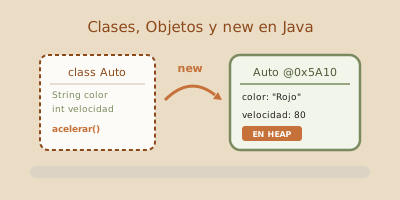
Object-Oriented Programming (OOP) revolves around two core concepts that shape how software is structured in Java: Classes and Objects.
While procedural programming focuses on writing algorithms operating on loose, unorganized variables, OOP allows us to build software by modeling real-world entities or domain concepts, encapsulating their State (data) and Behavior (functions) into unified structures.
In this lesson, you will learn what a class is, how objects are instantiated in Heap memory, the role of the new operator, how to use the this reference, and how reference variables interact with the JVM Stack.
1. The Blueprint vs. Building Metaphor: Class vs. Object
To understand the distinction between a Class and an Object, consider an architect’s metaphor:
- Class (The Blueprint or Template): The abstract template defined in source code (
.java). It declares what characteristics (attributes) every instance will possess and what actions (methods) it can perform. The class itself occupies no instance data memory in the Heap during execution. - Object (The Concrete Building): The physical instance created in memory from the class blueprint. We can construct multiple houses (objects) from the same blueprint, each having its own paint color, address, and unique state.
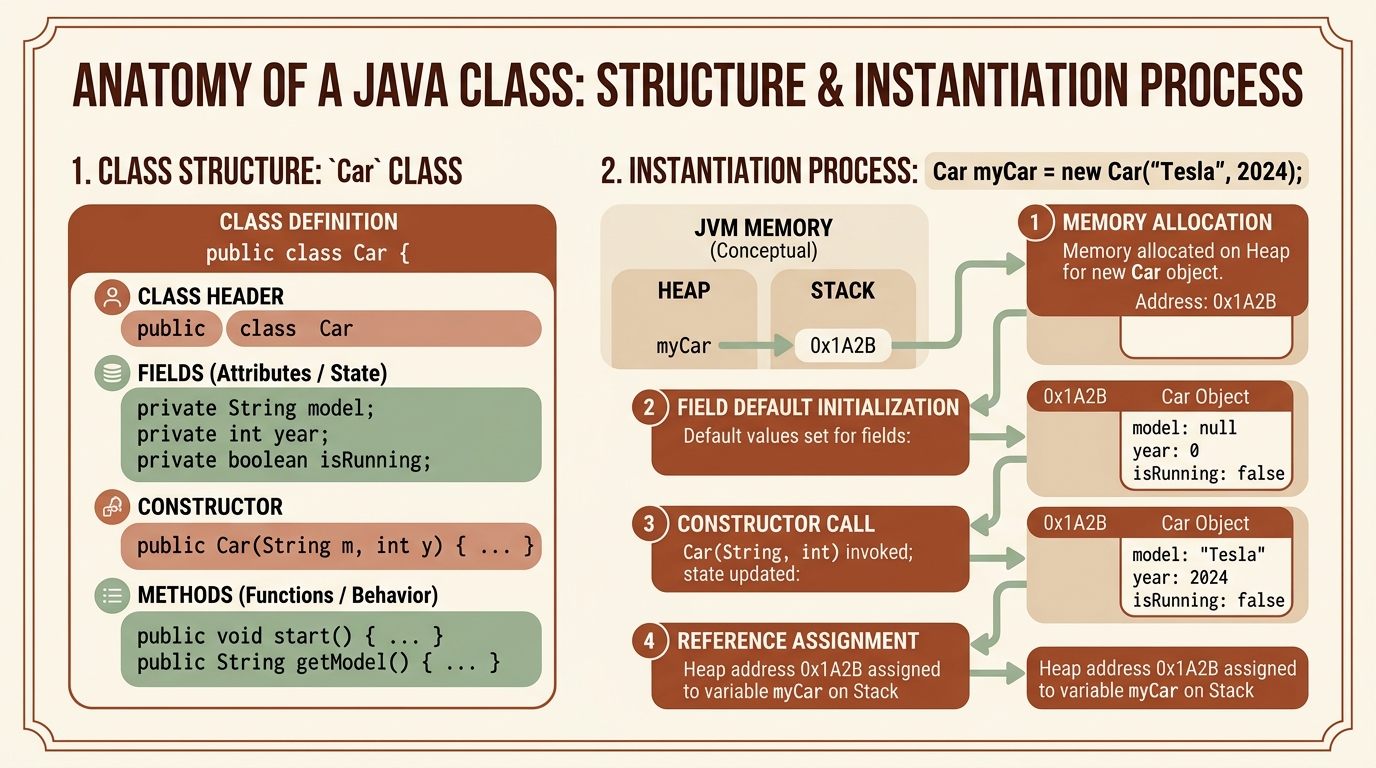
Internal Anatomy of a Class:
- Attributes / Fields (State): Variables representing the data or information an object stores.
- Methods (Behavior): Functions defining the operations and business logic an object can perform upon its state.
2. The new Operator and Memory Instantiation Lifecycle
To create an object in Java from a class blueprint, use the new keyword.
// Instantiation syntax:
ClassName referenceVariable = new ClassName();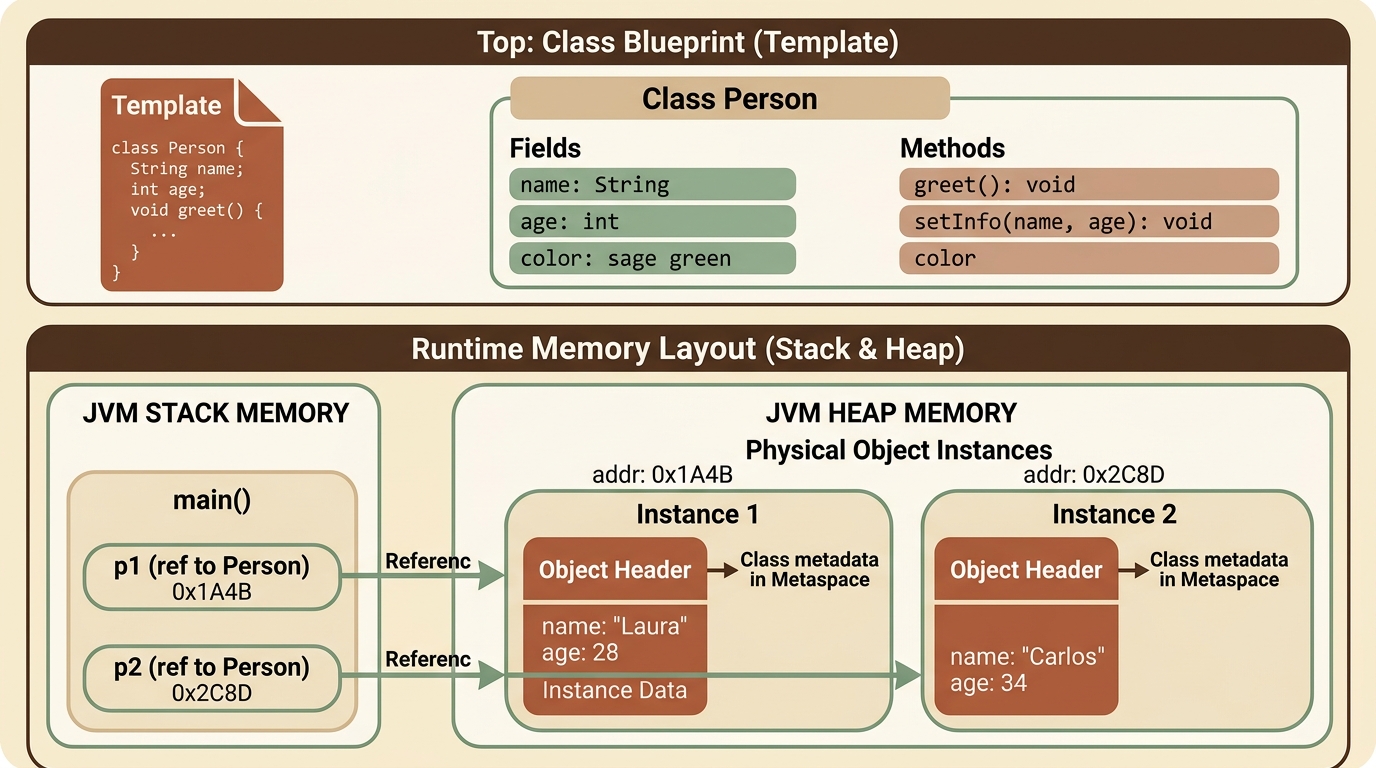
What happens internally when executing new?
- Heap Memory Allocation: The JVM calculates the memory footprint required for all class attributes and allocates a memory block in the Heap.
- Field Default Initialization:
int,long,byte$\rightarrow$0double,float$\rightarrow$0.0boolean$\rightarrow$false- Object References (
String, etc.) $\rightarrow$null
- Constructor Invocation: The class constructor runs to set initial state.
- Reference Assignment: The
newoperator returns the memory address of the new instance in Heap, which is stored in the reference variable on the Stack.
3. Practical Example: Modeling a Person Class
Let’s see how to implement a complete class in Java and instantiate multiple independent objects in the main method:
// Template definition (Person Class)
public class Person {
    // 1. Attributes (Object State)
    public String name;
    public int age;
    public double height;

    // 2. Methods (Object Behavior)
    public void greet() {
        System.out.println("Hello, my name is " + name + " and I am " + age + " years old.");
    }

    public void haveBirthday() {
        age++;
        System.out.println("Happy Birthday " + name + "! You are now " + age + " years old.");
    }
}
Instantiation and Usage in Main Class:
public class MainPerson {
    public static void main(String[] args) {
        // Instance 1: Create first object in Heap
        Person p1 = new Person();
        p1.name = "Laura";
        p1.age = 28;
        p1.height = 1.68;

        // Instance 2: Create second completely independent object
        Person p2 = new Person();
        p2.name = "Carlos";
        p2.age = 34;
        p2.height = 1.80;

        // Execute behavior
        p1.greet(); // Prints: Hello, my name is Laura and I am 28 years old.
        p2.greet(); // Prints: Hello, my name is Carlos and I am 34 years old.

        p1.haveBirthday(); // Mutates p1 internal state only (age becomes 29)
        System.out.println("p2 age remains: " + p2.age); // Remains 34
    }
}
4. The this Keyword and Variable Shadowing
Inside any instance method, the this keyword is an implicit reference to the current object executing the method.
Primary uses of this:
- Resolving ambiguity between parameters and fields: Occurs when a method parameter shares the exact name as a class attribute (known as Variable Shadowing).
- Passing the current instance as an argument to other methods.
public class Student {
    private String name; // Class field
    private double finalGrade;

    // Parameter 'name' shadows field 'name'
    public void setDetails(String name, double finalGrade) {
        // this.name refers to the object's field in Heap memory
        // 'name' on the right refers to local parameter in Stack Frame
        this.name = name;
        this.finalGrade = finalGrade;
    }

    public void displayRecord() {
        System.out.println("Student: " + this.name + " | Grade: " + this.finalGrade);
    }
}
5. References vs. Object Copies
It is crucial to understand that a variable holding an object does not contain the object data directly, but a memory address (reference) to the Heap.
Person p1 = new Person();
p1.name = "Ana";

// We copy the reference address, NOT the physical object:
Person p2 = p1;

// Modifying p2 MUTATES p1 because both variables point to the same Heap object
p2.name = "Ana Maria";

System.out.println(p1.name); // Prints: "Ana Maria"
6. Guided Hands-on Exercise
Challenge: Bank Account Management System
Write a Java class named BankAccount.java containing:
- Attributes:
accountHolder(String),accountNumber(String), andbalance(double). - A
deposit(double amount)method increasing balance if amount is positive. - A
withdraw(double amount)method decreasing balance only if funds are sufficient and amount is valid. - A
displayStatus()method printing account details.
View Suggested Solution
public class BankAccount {
    public String accountHolder;
    public String accountNumber;
    public double balance;

    public void deposit(double amount) {
        if (amount > 0) {
            this.balance += amount;
            System.out.println(" Deposit successful of $" + amount + " into account " + accountNumber);
        } else {
            System.out.println(" Error: Deposit amount must be greater than zero.");
        }
    }

    public void withdraw(double amount) {
        if (amount > 0 && amount <= this.balance) {
            this.balance -= amount;
            System.out.println(" Withdrawal successful of $" + amount + ". Remaining balance: $" + this.balance);
        } else {
            System.out.println(" Error: Insufficient funds or invalid withdrawal amount.");
        }
    }

    public void displayStatus() {
        System.out.println("==========================================");
        System.out.println(" Account Holder: " + this.accountHolder);
        System.out.println(" Account No:     " + this.accountNumber);
        System.out.println(" Balance:        $" + this.balance);
        System.out.println("==========================================");
    }

    public static void main(String[] args) {
        BankAccount acc1 = new BankAccount();
        acc1.accountHolder = "Mariana Perez";
        acc1.accountNumber = "001-987654";
        acc1.balance = 5000.0;

        acc1.displayStatus();
        acc1.deposit(1500.0);
        acc1.withdraw(2000.0);
        acc1.withdraw(10000.0); // Withdrawal exceeding balance
        acc1.displayStatus();
    }
}