Facundo Uferer
Concurrent Programming: Threads, Synchronization, and Pools
In the era of multi-core processors, concurrent programming is a crucial discipline for fully leveraging hardware capacity, building high-throughput web servers, and executing I/O bound or heavy computational tasks without blocking the main application flow.
In this lesson, you will learn to manage execution threads in Java, understand the shared memory model and its synchronization challenges, manage thread pools using the java.util.concurrent framework, and explore modern Virtual Threads introduced in recent versions of the language.
1. Concurrency vs. Parallelism and Java Memory Model
Before writing code, it is essential to distinguish between two concepts that are frequently confused:
- Concurrency: Managing multiple tasks by interleaving their execution over time. Can occur even on a single-core processor using Time-Slicing by the OS scheduler.
- Parallelism: Physically executing two or more tasks at the exact same instant across separate CPU cores.
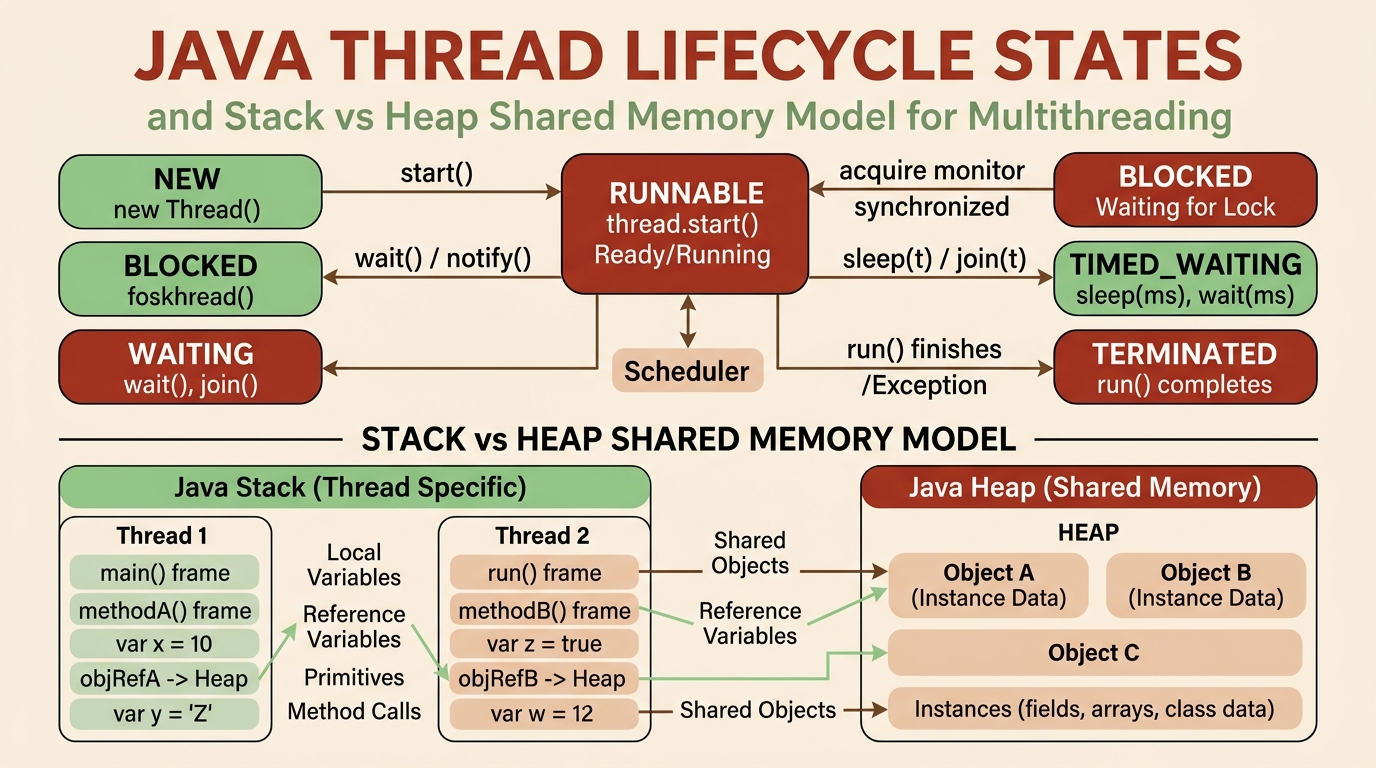
The Java Memory Model (JMM):
- Stack: Every thread possesses its own private execution stack storing local variables and object references.
- Heap: Global shared memory accessible by all threads where instantiated objects reside. Concurrency challenges arise when multiple threads attempt to read and write to shared Heap memory simultaneously.
2. Thread Creation and Lifecycle (Thread vs Runnable vs Callable)
In Java, a Thread represents the smallest unit of execution scheduled by the operating system.
Defining Thread Tasks:
Option A: Implementing the Runnable Functional Interface (Recommended)
public class RunnableTask implements Runnable {
    @Override
    public void run() {
        System.out.println("Executing inside thread: " + Thread.currentThread().getName());
    }
}

// Lambda usage:
Thread thread1 = new Thread(() -> System.out.println("Parallel thread running"));
thread1.start(); // NEVER call run() directly; start() spawns the OS thread.
Option B: Result-bearing tasks with Callable<V> and Future<V>
Unlike Runnable, Callable can return a value and throw checked exceptions:
import java.util.concurrent.*;

Callable<Integer> complexTask = () -> {
    Thread.sleep(1000);
    return 42 * 2;
};
3. Race Conditions and Synchronization
When two or more threads mutate a shared variable without coordination, a Race Condition occurs, causing silent data corruption.
The Non-Atomic Increment Problem (count++):
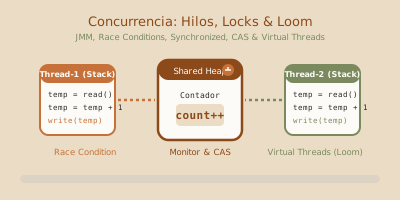
The count++ operation consists of 3 distinct steps: (1) Read current value, (2) Increment by 1, (3) Write new value. If two threads execute this concurrently, they can overwrite each other’s updates.
public class UnsafeCounter {
    private int count = 0;

    // UNSAFE: If 10 threads increment 1000 times each, final count will rarely equal 10000.
    public void increment() {
        count++;
    }
}
Synchronization Solutions in Java:
1. synchronized Blocks and Methods (Intrinsic Locks)
Guarantees mutual exclusion: only one thread can execute the protected block at a time.
public class SafeCounter {
    private int count = 0;

    public synchronized void increment() {
        count++; // Thread-safe
    }

    public synchronized int getCount() {
        return count;
    }
}
2. Atomic Variables (java.util.concurrent.atomic)
For simple numeric operations, atomic classes use hardware-level instructions (Compare-And-Swap - CAS) without lock overhead:
import java.util.concurrent.atomic.AtomicInteger;

public class AtomicCounter {
    private AtomicInteger count = new AtomicInteger(0);

    public void increment() {
        count.incrementAndGet(); // Pure atomic operation
    }
}
3. Memory Visibility with volatile
The volatile keyword instructs the JVM to read and write a variable directly to/from main RAM memory, bypassing CPU core caches (L1/L2).
4. Thread Pools with ExecutorService
In production applications, manually creating individual threads via new Thread() is an anti-pattern: OS thread creation is expensive in CPU and memory (~1MB stack per thread), and spawning unbounded threads risks out-of-memory crashes (OutOfMemoryError).
The solution is to reuse a managed set of worker threads using Thread Pools via the ExecutorService API.
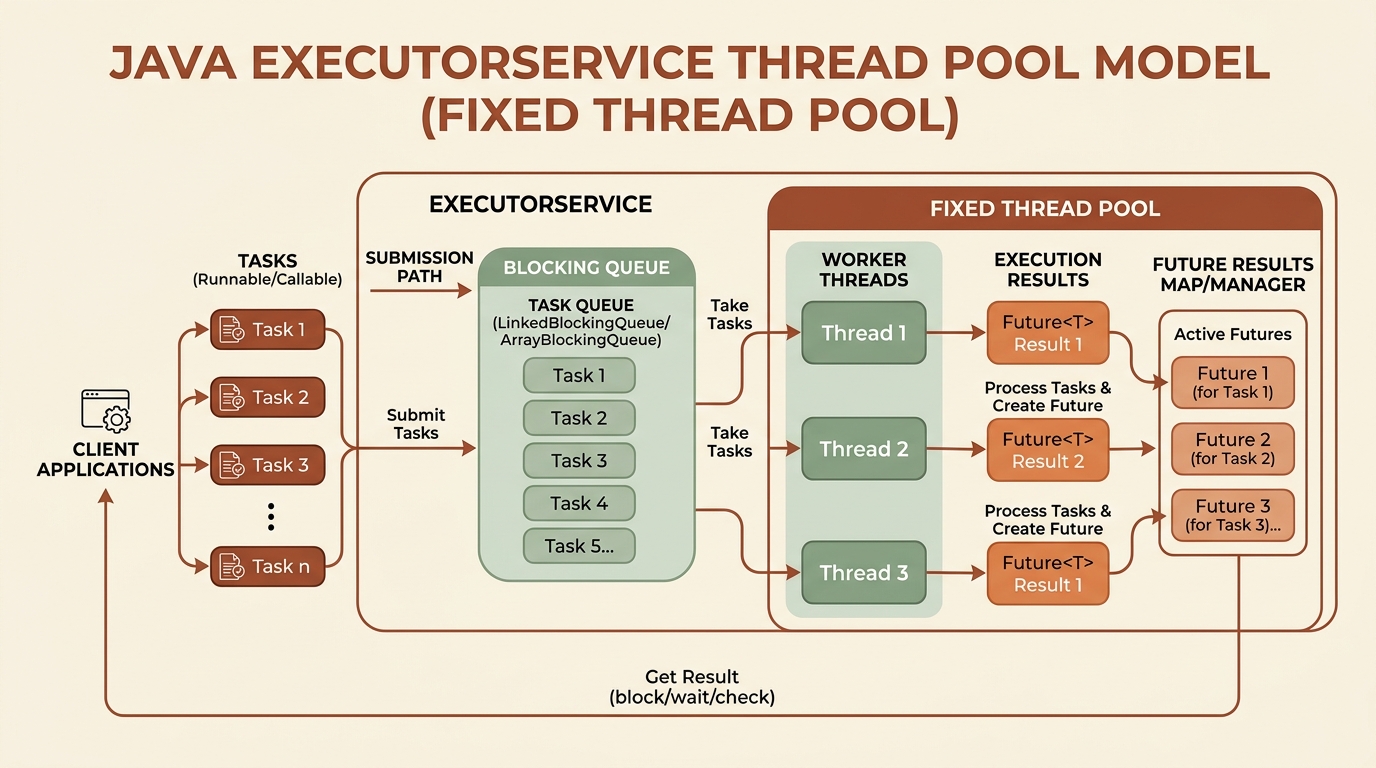
Common Thread Pool Factories:
Executors.newFixedThreadPool(int n): Reuses a fixed number of worker threads.Executors.newCachedThreadPool(): Creates threads on demand and reclaims idle ones.Executors.newSingleThreadExecutor(): Guarantees sequential task execution on a single worker thread.
Practical ExecutorService and Future Example:
import java.util.concurrent.*;

public class ThreadPoolExample {
    public static void main(String[] args) throws InterruptedException, ExecutionException {
        // 1. Create a Pool of 3 worker threads
        ExecutorService executor = Executors.newFixedThreadPool(3);

        // 2. Submit Callable tasks returning Future results
        Future<String> task1 = executor.submit(() -> {
            Thread.sleep(1500);
            return "Process A result";
        });

        Future<String> task2 = executor.submit(() -> {
            Thread.sleep(1000);
            return "Process B result";
        });

        // 3. Retrieve results from Futures (.get() blocks until task completion)
        System.out.println("Waiting for responses...");
        System.out.println("Received: " + task1.get());
        System.out.println("Received: " + task2.get());

        // 4. Shutdown executor to allow clean JVM exit
        executor.shutdown();
        executor.awaitTermination(5, TimeUnit.SECONDS);
    }
}
5. The Future of Concurrency: Virtual Threads (Java 21+)
In recent Java releases (Project Loom), the platform introduced Virtual Threads. Unlike traditional OS-backed platform threads, Virtual Threads are lightweight threads managed directly by the JVM in user space.
You can launch millions of virtual threads concurrently without overwhelming RAM or the underlying OS:
// Creating a Virtual Thread per task Executor (Java 21+)
try (var executor = Executors.newVirtualThreadPerTaskExecutor()) {
    for (int i = 0; i < 10_000; i++) {
        final int taskId = i;
        executor.submit(() -> {
            Thread.sleep(1000);
            return "Virtual task #" + taskId;
        });
    }
} // Try-with-resources automatically closes the executor when tasks finish
6. Guided Hands-on Exercise
Challenge: Concurrent Download Manager
Develop a program simulating the download of 5 heavy files using a pool of 2 concurrent worker threads:
- Each download task should take a random duration between 1 to 3 seconds and print start/completion logs including the processing thread name.
- Measure the total elapsed time from start until pool termination.
View Suggested Solution
import java.util.concurrent.*;
import java.util.Random;

public class ConcurrentDownloader {

    static class DownloadTask implements Runnable {
        private final String fileName;

        public DownloadTask(String fileName) {
            this.fileName = fileName;
        }

        @Override
        public void run() {
            String currentThread = Thread.currentThread().getName();
            System.out.println("[" + currentThread + "] Starting download: " + fileName);
            try {
                int downloadTime = 1000 + new Random().nextInt(2000);
                Thread.sleep(downloadTime);
                System.out.println("[" + currentThread + "] ✔ Completed download: " + fileName);
            } catch (InterruptedException e) {
                Thread.currentThread().interrupt();
            }
        }
    }

    public static void main(String[] args) throws InterruptedException {
        long start = System.currentTimeMillis();
        ExecutorService pool = Executors.newFixedThreadPool(2);

        String[] files = {"video_hd.mp4", "backup.zip", "dataset.csv", "doc.pdf", "image.raw"};

        for (String file : files) {
            pool.submit(new DownloadTask(file));
        }

        pool.shutdown();
        pool.awaitTermination(30, TimeUnit.SECONDS);

        long end = System.currentTimeMillis();
        System.out.println("==========================================");
        System.out.println("All downloads finished in: " + (end - start) + " ms");
        System.out.println("==========================================");
    }
}
7. Thread Coordination: wait(), notify(), and Deadlocks
synchronized, atomic variables, and volatile solve exclusive access to shared data, but they fall short when a thread needs to wait for another thread to bring a condition to a particular state (for example, “an item is available” or “there is free space”). For that, Java exposes wait(), notify(), and notifyAll(), inherited from Object. With them comes the opposite risk of a race condition: the deadlock, a dead end where the program stops making progress forever.
The monitor: why wait() and notify() require the lock
Every Java object has an implicit monitor associated with it. wait(), notify(), and notifyAll() only make sense inside a synchronized block or method on that same object, because they require the calling thread to own the monitor:
wait()releases the monitor’s lock and suspends the thread until another thread callsnotify()/notifyAll()on the same object (or a timeout expires, if the timed variant was used). Before returning control, the thread reacquires the lock.notify()wakes up one thread waiting on that monitor, chosen non-deterministically.notifyAll()wakes up every thread waiting on that monitor; each one competes again for the lock.
If any of these methods is called outside a synchronized block on the corresponding object, the JVM throws IllegalMonitorStateException at runtime: there is no way to “wait” or “signal” on a lock the thread does not own.
public class SharedResource {
    private final Object lock = new Object();
    private boolean dataReady = false;

    public void produce() {
        synchronized (lock) {
            dataReady = true;
            lock.notifyAll(); // wake every thread waiting on "lock"
        }
    }

    public void consume() throws InterruptedException {
        synchronized (lock) {
            while (!dataReady) {
                lock.wait(); // release "lock" and wait for produce() to signal
            }
            System.out.println("Data ready to consume");
        }
    }
}

// lock.wait();          // outside synchronized (lock): IllegalMonitorStateException
The condition loop: while, never if
wait() can return without the expected condition actually being true. This happens for two reasons:
- Spurious wakeup: the Java specification allows a thread to return from
wait()without anyone having callednotify()/notifyAll(), for internal JVM or operating-system reasons. - Condition already consumed: with
notifyAll(), several threads compete for the lock; the first one to reacquire it may leave the condition in a state that no longer applies to the rest.
That is why the condition is checked inside a while, never an if:
synchronized (lock) {
    while (!conditionMet()) { // re-check every time the thread wakes up
        lock.wait();
    }
    // it is now guaranteed that conditionMet() is true
}
An if checks the condition only once, before sleeping; if the thread wakes up spuriously (or the condition changes again), it proceeds with invalid data without the compiler or runtime ever warning about it.
Prefer notifyAll() instead of notify()
notify() wakes up a single, arbitrarily chosen thread. If the monitor has threads waiting for different conditions (for example, some waiting for “there is space” and others for “there is an item”), notify() can wake the wrong thread, which re-checks its condition, finds it false, and goes back to sleep: the thread that could actually proceed is never signaled. This is known as a lost wakeup.
notifyAll() wakes everyone; each thread checks its own while and only the right one proceeds. It costs more CPU because everyone competes for the lock, but it is the safe default. Use notify() only when you can prove every waiting thread shares exactly the same condition.
Example: producer-consumer bounded buffer
A classic coordination case is a bounded buffer: producers wait when it is full, consumers wait when it is empty.
import java.util.ArrayDeque;
import java.util.Deque;

public class BoundedBuffer<T> {
    private final Object lock = new Object();
    private final Deque<T> items = new ArrayDeque<>();
    private final int capacity;

    public BoundedBuffer(int capacity) {
        if (capacity <= 0) {
            throw new IllegalArgumentException("capacity must be positive");
        }
        this.capacity = capacity;
    }

    public void put(T item) throws InterruptedException {
        synchronized (lock) {
            while (items.size() == capacity) {
                lock.wait(); // no room: wait for a consumer to free one slot
            }
            items.addLast(item);
            lock.notifyAll(); // may wake a consumer waiting for an item
        }
    }

    public T take() throws InterruptedException {
        synchronized (lock) {
            while (items.isEmpty()) {
                lock.wait(); // no items: wait for a producer to add one
            }
            T item = items.removeFirst();
            lock.notifyAll(); // may wake a producer waiting for space
            return item;
        }
    }
}
put() and take() share the same lock (the lock object itself), so they never run at the same time. notifyAll() is mandatory here because two different conditions coexist on the same monitor (“there is space” and “there is an item”); notify() could wake the wrong thread and leave the program stuck.
Deadlocks: the four Coffman conditions
A deadlock happens when two or more threads are blocked forever, each one waiting for a resource that another one holds. Coffman described four conditions that, all together, make a deadlock possible:
- Mutual exclusion: at least one resource (a lock) can only be used by one thread at a time.
- Hold-and-wait: a thread holds a resource while waiting to acquire another.
- No preemption: a resource cannot be forcibly taken from a thread; it is only released voluntarily.
- Circular wait: there is a cycle of threads where each one waits for a resource held by the next.
Breaking any one of the four conditions prevents deadlock. In practice, the easiest one to attack in Java code is circular wait, through a consistent acquisition order.
A minimal deadlock with two locks
public class DeadlockDemo {
    private static final Object LOCK_A = new Object();
    private static final Object LOCK_B = new Object();

    static void transferAtoB() {
        synchronized (LOCK_A) {
            sleepBriefly();
            synchronized (LOCK_B) {
                System.out.println("Transfer A -> B complete");
            }
        }
    }

    static void transferBtoA() {
        synchronized (LOCK_B) {
            sleepBriefly();
            synchronized (LOCK_A) {
                System.out.println("Transfer B -> A complete");
            }
        }
    }

    private static void sleepBriefly() {
        try {
            Thread.sleep(50);
        } catch (InterruptedException e) {
            Thread.currentThread().interrupt();
        }
    }

    public static void main(String[] args) {
        new Thread(DeadlockDemo::transferAtoB).start();
        new Thread(DeadlockDemo::transferBtoA).start();
        // with unlucky interleaving, both threads block forever: one holds
        // LOCK_A and waits for LOCK_B, the other holds LOCK_B and waits for
        // LOCK_A
    }
}
If the first thread enters transferAtoB() and acquires LOCK_A, and almost simultaneously the second thread enters transferBtoA() and acquires LOCK_B, both end up waiting for a lock the other already holds and will never release. The program throws no exception: it simply stops making progress.
Prevention: lock ordering, tryLock with a timeout, and bounded critical sections
- Consistent lock ordering. If every thread acquires
LOCK_AbeforeLOCK_B(never the other way around), circular wait becomes impossible. When the locks are dynamic, a stable order such asSystem.identityHashCode()works as a criterion:
static void transferOrdered(Object first, Object second, Runnable action) {
    Object low = System.identityHashCode(first) <= System.identityHashCode(second) ? first : second;
    Object high = low == first ? second : first;
    synchronized (low) {
        synchronized (high) {
            action.run();
        }
    }
}tryLockwith a timeout.ReentrantLockallows attempting to acquire a lock with a timeout instead of blocking indefinitely. If the second lock cannot be obtained, the thread releases the first one and can retry later:
import java.util.concurrent.TimeUnit;
import java.util.concurrent.locks.ReentrantLock;

ReentrantLock lockA = new ReentrantLock();
ReentrantLock lockB = new ReentrantLock();

boolean transfer() throws InterruptedException {
    if (lockA.tryLock(500, TimeUnit.MILLISECONDS)) {
        try {
            if (lockB.tryLock(500, TimeUnit.MILLISECONDS)) {
                try {
                    return true; // critical section holding both locks
                } finally {
                    lockB.unlock();
                }
            }
        } finally {
            lockA.unlock();
        }
    }
    return false; // could not acquire both locks: retry later
}- Bounded critical sections. The shorter the
synchronizedblock (or the span betweenlock()andunlock()), the less time a thread holds a resource and the smaller the window for a deadlock. Avoid calling unknown code (I/O, callbacks, another lock) while holding a lock.
Diagnosis: jstack, thread dumps, and JConsole/VisualVM
When a program stops responding, the first question is whether it is deadlocked or just slow. jstack, bundled with the JDK, produces a thread dump with the state and stack trace of every JVM thread:
jps                        # list running Java processes and their PID
jstack <pid> > thread-dump.txt
grep -A 20 "Found one Java-level deadlock" thread-dump.txt
If there is a deadlock, jstack detects it automatically and prints a section with the literal text Found one Java-level deadlock, followed by the involved threads, which lock each one holds, and which one it is waiting for.
JConsole and VisualVM, both bundled with or downloadable alongside the JDK, surface the same information graphically: the Threads tab has a “Detect Deadlock” button that highlights threads blocking each other and their wait chain, without having to read a text dump by hand.
Safer high-level alternatives
wait()/notify()/synchronized are the lowest-level tools; using them by hand is error-prone. java.util.concurrent offers higher-level utilities that already solve these problems internally:
BlockingQueue(ArrayBlockingQueue,LinkedBlockingQueue): directly replaces a hand-rolled bounded buffer.put()andtake()already handle waiting and signaling correctly.ReentrantLock+Condition: instead of a single monitor withwait()/notifyAll(),newCondition()allows multiple independent wait sets (for example, one for “not full” and another for “not empty”), avoiding waking up threads that do not apply.CountDownLatch: coordinates a “wait until N tasks finish” event, such as waiting for several startup threads to complete before accepting traffic.- The rest of
java.util.concurrent(Semaphore,CyclicBarrier,ExecutorService,CompletableFuture) covers the vast majority of coordination scenarios without touchingwait()/notify()directly. Reserve the manual monitor for understanding these tools or maintaining legacy code.