Facundo Uferer
Arrays and String Handling in Java
So far you have stored data in individual variables: one age, one name, one price. That works as long as you know upfront how many values you need. But the moment you have to handle the grades of a course, the pixels of an image, or the words of a document, declaring grade1, grade2, grade3… stops being an option.
The array is the language’s first data structure: a fixed-size container that holds many values of the same type under a single name. And the String —which looks like just another type— is really an object built on top of a character array, with one rule of its own that changes everything: it is immutable.
This lesson covers both together because they share the same foundation: how Java lays data out in memory. Understanding that is what later explains why == fails when comparing text, why concatenating inside a loop is slow, and why an array cannot grow.
1. Why arrays exist: contiguous memory and constant-time access
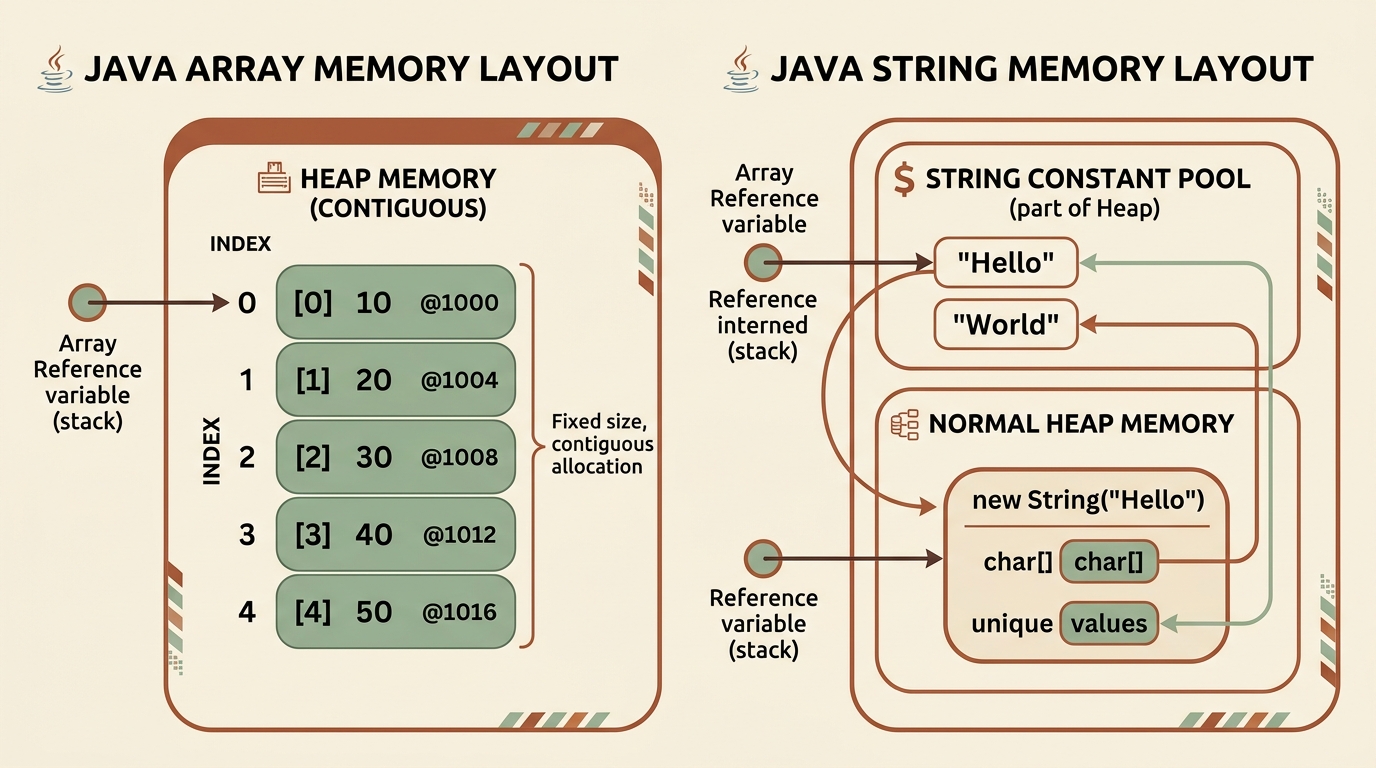
An array is a contiguous block of memory —a single stretch, no gaps— divided into slots of the same size. That design decision explains almost everything else.
Three consequences worth internalising from the start:
- The index starts at 0 because it does not count positions, it measures offset.
ages[0]sits zero slots from the beginning. That is why the last valid index is alwayslength - 1. - Access is instant —written O(1) in algorithm analysis. There is no searching: there is arithmetic. This property is what makes the array the foundation of nearly every other data structure.
- The size cannot change. Right after the block, something else lives in memory. To “grow” an array you must request a new block and copy; see section 4.
lengthis a field, not a method: you writearray.lengthwithout parentheses. OnString, however, it is a method:text.length(). This is one of Java’s historical inconsistencies and a classic source of compile errors.
2. Declaring, instantiating, and initializing
These are three different things and it pays not to blur them: declaring creates the variable, instantiating reserves the block on the Heap, initializing puts the values in.
// Form 1: declare and instantiate empty (Java fills in default values)
int[] ages = new int[5];

// Form 2: initialization literal (the compiler infers the size)
String[] languages = {"Java", "Python", "TypeScript", "Go"};

// Form 3: anonymous instantiation (handy for passing an array to a method)
print(new int[]{10, 20, 30});

// Declare now, instantiate later
double[] prices;          // prices is null: there is no block yet
prices = new double[3];   // now the block exists
The int ages[] syntax also compiles —inherited from C— but do not use it. int[] ages says the right thing: the variable’s type is array of int, not int.
Default values on new instantiation
Java never leaves memory full of garbage: when it reserves the block it zeroes it out, and each type reads those zeroes its own way.
| Type | Default value |
|---|---|
byte, short, int, long | 0 |
float, double | 0.0 |
char | '\u0000' (the null character) |
boolean | false |
Any reference (String, objects, arrays) | null |
This has an important practical consequence: new String[3] does not give you three empty strings, it gives you three nulls. Iterating over it and calling .length() without checking ends in a NullPointerException.
The two errors you will definitely see
int[] data = new int[3];

data[3] = 99;   // ArrayIndexOutOfBoundsException: Index 3 out of bounds for length 3
data[-1] = 99;  // ArrayIndexOutOfBoundsException: Index -1 out of bounds for length 3

int n = -5;
int[] other = new int[n];   // NegativeArraySizeException: -5
All three are runtime errors, not compile errors: the compiler cannot know what value the index will hold. Java checks the range on every access —unlike C, where writing past the end of an array silently corrupts memory. It is a small cost in exchange for the error surfacing exactly where it happened.
3. Iterating an array
String[] fruits = {"Apple", "Banana", "Orange", "Strawberry"};

// A) classic for: you have the index, you can modify the array
for (int i = 0; i < fruits.length; i++) {
    System.out.println("Index " + i + ": " + fruits[i]);
}

// B) for-each: cleaner when the index does not matter
for (String fruit : fruits) {
    System.out.println("Fruit: " + fruit);
}

// C) backwards
for (int i = fruits.length - 1; i >= 0; i--) {
    System.out.println(fruits[i]);
}
When to use each. for-each is the default choice: it reads better and eliminates index errors entirely. But it has a limitation that surprises many people:
int[] numbers = {1, 2, 3};

for (int n : numbers) {
    n = n * 2;          // does NOT modify the array: n is a copy of the value
}
System.out.println(Arrays.toString(numbers));   // [1, 2, 3]

for (int i = 0; i < numbers.length; i++) {
    numbers[i] = numbers[i] * 2;   // this DOES modify it
}
System.out.println(Arrays.toString(numbers));   // [2, 4, 6]
The for-each variable is a copy of each element, not the slot itself. Simple rule: if you have to write into the array, you need the index; if you only have to read it, use for-each.
4. The size is fixed: what to do when the array fills up
There is no array.add(...). An array of 4 slots dies with 4 slots. When you need more, the only way out is to request a new block and copy the contents over.
ArrayList viable, as you will see in the collections lesson.import java.util.Arrays;
int[] data = {10, 20, 30, 40};
// Option 1: Arrays.copyOf — the most readable
int[] bigger = Arrays.copyOf(data, 8); // [10, 20, 30, 40, 0, 0, 0, 0]
// Option 2: a specific range (the end index is NOT included)
int[] middle = Arrays.copyOfRange(data, 1, 3); // [20, 30]
// Option 3: System.arraycopy — full control over source and destination
int[] target = new int[8];
System.arraycopy(data, 0, target, 0, data.length);
// source, from, target, to, how manyThis manual work is precisely what ArrayList saves you. But it is worth doing by hand once: it is the only way to understand why adding to a list is sometimes instant and sometimes not.
5. Arrays of primitives vs. arrays of objects
The difference matters far more than it looks.
int[] numbers = new int[3];     // 3 slots holding the value 0
String[] names = new String[3]; // 3 slots holding the reference null

System.out.println(numbers[0]);        // 0
System.out.println(names[0]);          // null
System.out.println(names[0].length()); // NullPointerException
An array of primitives holds the values. An array of objects holds references: the objects live elsewhere on the Heap and the array only stores their addresses. That explains how copies behave:
StringBuilder[] original = { new StringBuilder("Hello") };
StringBuilder[] copy = Arrays.copyOf(original, 1);

copy[0].append(" world");

System.out.println(original[0]);               // "Hello world"  ← it changed too!
System.out.println(original[0] == copy[0]);    // true
Arrays.copyOf performs a shallow copy: it duplicates the array of references, not the objects they point at. The two arrays are distinct, but they point at the same objects. If you need genuine independence —a deep copy— you have to clone each element yourself.
With String this problem never shows up, and the reason is section 8: Strings are immutable, so sharing a reference cannot do any harm.
Object arrays have a good deal more to them —
nullslots, sorting with aComparator, capacity versus count— but they need classes and constructors first. That is why they get their own lesson: Arrays of Objects, number 9, right after encapsulation.
6. Matrices and jagged arrays
Java has no matrix type. What it has is an array whose elements are themselves arrays.
int[][] is an array of references. The rows live separately on the Heap, so nothing forces them to be the same size: that is a jagged array.// Rectangular matrix: 3 rows x 3 columns
int[][] grid = {
{1, 2, 3},
{4, 5, 6},
{7, 8, 9}
};
// Iteration with nested loops
for (int row = 0; row < grid.length; row++) {
for (int col = 0; col < grid[row].length; col++) { // ← length of THAT row
System.out.print(grid[row][col] + " ");
}
System.out.println();
}
// Nested for-each (when you do not need the indices)
for (int[] row : grid) {
for (int value : row) {
System.out.print(value + " ");
}
System.out.println();
}A jagged array, where each row has its own size:
int[][] data = new int[3][];      // only the outer array; the rows stay null
data[0] = new int[]{1, 2, 3};
data[1] = new int[]{4, 5, 6, 7, 8};
data[2] = new int[]{9, 0};

System.out.println(data[1].length);   // 5
Writing grid[row].length instead of grid[0].length is not a stylistic detail: it is what makes the same loop work for both rectangular and jagged arrays.
To print a whole matrix,
Arrays.toString()is not enough: it shows you the memory addresses of the rows. UseArrays.deepToString(grid).
7. java.util.Arrays: the tool belt
Almost nothing you need to do with an array has to be written by hand. java.util.Arrays already has it.
| Method | What it does |
|---|---|
Arrays.toString(a) | Readable representation of a one-dimensional array |
Arrays.deepToString(m) | The same for matrices and nested arrays |
Arrays.sort(a) | Sorts modifying the original array (in place) |
Arrays.sort(a, from, to) | Sorts only a range |
Arrays.binarySearch(a, v) | Binary search — requires an already sorted array |
Arrays.copyOf(a, n) | Resized copy |
Arrays.copyOfRange(a, f, t) | Copy of a range, t excluded |
Arrays.fill(a, v) | Fills every slot with a value |
Arrays.equals(a, b) | Compares the contents of one-dimensional arrays |
Arrays.deepEquals(m, n) | Compares the contents of nested arrays |
Arrays.stream(a) | Turns the array into a stream to sum, filter, average |
import java.util.Arrays;

public class ArraysExample {
    public static void main(String[] args) {
        int[] numbers = {42, 12, 89, 7, 23};

        System.out.println("Original: " + Arrays.toString(numbers));

        Arrays.sort(numbers);                        // sorts the original array
        System.out.println("Sorted: " + Arrays.toString(numbers));   // [7, 12, 23, 42, 89]

        int index = Arrays.binarySearch(numbers, 23);
        System.out.println("Index of 23: " + index);                 // 2

        int[] copy = Arrays.copyOf(numbers, 3);
        System.out.println("Copy: " + Arrays.toString(copy));        // [7, 12, 23]

        int[] zeros = new int[5];
        Arrays.fill(zeros, -1);
        System.out.println(Arrays.toString(zeros));                  // [-1, -1, -1, -1, -1]

        // Statistics without writing a single loop
        System.out.println("Sum: " + Arrays.stream(numbers).sum());
        System.out.println("Max: " + Arrays.stream(numbers).max().getAsInt());
        System.out.println("Average: " + Arrays.stream(numbers).average().getAsDouble());
    }
}
Two traps worth knowing
1. == is no good for comparing arrays either. It compares references, just like with any object:
int[] a = {1, 2, 3};
int[] b = {1, 2, 3};

System.out.println(a == b);                // false — two distinct blocks
System.out.println(a.equals(b));           // false — an array does not override equals
System.out.println(Arrays.equals(a, b));   // true  — this is the right one
2. binarySearch on an unsorted array silently returns garbage. It throws nothing, warns about nothing: it just returns a meaningless number, because the algorithm assumes the array is sorted. Always sort before searching.
8. Strings: why they are immutable
A String is an object wrapping a sequence of characters. Its central rule is that once created, its contents never change. No String method modifies the original string: they all return a new one.
= sign reassigns the variable. The original object stays untouched and, if nothing else points at it, becomes garbage.String text = "hello";
text.toUpperCase(); // returns "HELLO", but it is discarded
System.out.println(text); // "hello" — nothing changed
String upper = text.toUpperCase(); // this is the way: keep the result
System.out.println(upper); // "HELLO"Forgetting the assignment is the number-one String mistake. Since the method neither fails nor warns, the program keeps running with the old value.
Why did Java make this decision? It is not arbitrary:
- Security. File paths, URLs, and credentials travel as
String. If they were mutable, a method you handed an already-validated path to could change it after validation. - Concurrency. An object that never changes can be shared across threads with no synchronization at all.
- Hashing performance.
Stringcomputes itshashCode()once and caches it. That is what makes strings fast asHashMapkeys. - Reuse. Since nobody can modify them, the JVM can share one object across many variables. That is the pool.
9. The String Constant Pool and the == trap
To avoid duplicating identical strings, the JVM maintains a special area inside the Heap called the String Constant Pool. When you write a quoted literal, the JVM looks in the pool first and reuses the object if it is already there.
== sometimes "seems to work" with strings. It works by coincidence, and stops working the moment the string is built at runtime.String s1 = "Java";
String s2 = "Java";
String s3 = new String("Java");
System.out.println(s1 == s2); // true — same reference from the pool
System.out.println(s1 == s3); // false — new always creates a separate object
System.out.println(s1.equals(s3)); // true — compares the contentsAnd the case that convinces anyone never to use ==:
String a = "Java";
String b = "Ja" + "va";                    // the compiler folds it: goes to the pool
System.out.println(a == b);                // true

String part = "Ja";
String c = part + "va";                    // built at runtime: a new object
System.out.println(a == c);                // false  ← same text, different object
System.out.println(a.equals(c));           // true
Golden rule: to compare the contents of two strings, always use
.equals()or.equalsIgnoreCase().==compares object identity and will betray you the moment the string comes from a file, from the console, or from a concatenation.
A defensive trick against NullPointerException: if either side could be null, put the literal on the left.
String input = null;

input.equals("quit");   // NullPointerException
"quit".equals(input);   // false — safe
10. Walking and slicing text: it is all about indices
A String is indexed just like an array, from 0 to length() - 1.
substring, copyOfRange, subList, and the Stream API.Essential String methods
| Method | Returns |
|---|---|
length() | Number of characters |
charAt(i) | The character at position i |
substring(f, t) | The fragment from f to t - 1 |
indexOf(s) / lastIndexOf(s) | First / last position of s, or -1 if absent |
contains(s) | true if s occurs in the string |
startsWith(s) / endsWith(s) | true if it starts / ends with s |
toUpperCase() / toLowerCase() | A copy in upper / lower case |
trim() / strip() | A copy without leading and trailing whitespace |
isEmpty() / isBlank() | Whether it has length 0 / only whitespace |
replace(a, b) | A copy with a replaced by b |
split(regex) | A String[] split by the separator |
String.join(sep, parts) | Joins several strings with a separator |
repeat(n) | The string repeated n times |
toCharArray() | A char[] with the characters |
String text = "  Learning Java in 2026  ";

System.out.println(text.length());              // 25
System.out.println(text.trim());                // "Learning Java in 2026"
System.out.println(text.toUpperCase());         // "  LEARNING JAVA IN 2026  "
System.out.println(text.contains("Java"));      // true
System.out.println(text.indexOf("Java"));       // 11
System.out.println(text.substring(11, 15));     // "Java"
System.out.println(text.replace("2026", "2027"));

// Split and join back
String csv = "Buenos Aires,Neuquén,Córdoba,Salta";
String[] provinces = csv.split(",");
System.out.println(provinces.length);           // 4
System.out.println(String.join(" | ", provinces));

// Walk character by character
String word = "Java";
for (int i = 0; i < word.length(); i++) {
    System.out.println(i + ": " + word.charAt(i));
}
for (char c : word.toCharArray()) {
    System.out.println(c);
}
trim() vs strip(), isEmpty() vs isBlank()
String s = "      ";

System.out.println(s.isEmpty());   // false — it has 6 characters
System.out.println(s.isBlank());   // true  — they are all whitespace
strip() (Java 11+) is the modern version of trim(): it understands the full range of Unicode whitespace, whereas trim() only removes characters below U+0020. In new code, use strip() and isBlank().
Formatting and interpolation
String name = "Laura";
double average = 8.457;

// Plain concatenation
System.out.println("Student: " + name + " — average " + average);

// formatted / String.format: control over decimals and width
System.out.println("Student: %s — average %.2f".formatted(name, average));
// Student: Laura — average 8.46

// Text blocks (Java 15+): line breaks without escapes
String json = """
        {
          "name": "Laura",
          "average": 8.46
        }
        """;
11. StringBuilder: when immutability gets expensive
Immutability has a price, and you pay it inside loops. Every += on a String creates a new object and copies everything accumulated so far.
StringBuilder writes into a buffer and only copies when it runs out of capacity.// INEFFICIENT: 1000 temporary objects and half a million characters copied
String result = "";
for (int i = 0; i < 1000; i++) {
result += i + ", ";
}
// EFFICIENT: one mutable buffer
StringBuilder sb = new StringBuilder();
for (int i = 0; i < 1000; i++) {
sb.append(i).append(", ");
}
String efficientResult = sb.toString();The StringBuilder API
StringBuilder sb = new StringBuilder("Hello");

sb.append(" world");            // "Hello world"
sb.insert(0, ">> ");            // ">> Hello world"
sb.replace(0, 3, "-- ");        // "-- Hello world"
sb.deleteCharAt(0);             // "- Hello world"
sb.reverse();                   // "dlrow olleH -"
System.out.println(sb.length());
System.out.println(sb.toString());   // convert to String at the end

// Chaining: every method returns the same StringBuilder
String phrase = new StringBuilder()
        .append("Java")
        .append(" ")
        .append(2026)
        .toString();
If you roughly know how much text you will accumulate, reserve the capacity upfront and skip every resize: new StringBuilder(4096).
When you do NOT need StringBuilder
The compiler already optimizes concatenation inside a single expression. This is perfectly fine as is:
String message = "Hi " + name + ", you have " + count + " messages";The problem only appears when concatenation is repeated across several iterations, because there the compiler cannot fuse them: each pass is a separate expression.
StringBuilder vs StringBuffer
They are the same class with the same API. StringBuffer is the older, synchronized version: every method is thread-safe, and that is why it is slower. Use StringBuilder unless several threads will write into the same buffer, which almost never happens.
12. Common mistakes
- Confusing
lengthwithlength().array.lengthis a field;text.length()is a method. - Comparing strings with
==. It works with literals and fails with everything else. Use.equals(). - Forgetting to assign the result.
text.trim();does nothing;text = text.trim();does. - Iterating up to
<= length. The last valid index islength - 1. - Calling
binarySearchwithout sorting. It does not fail: it silently returns a wrong result. - Expecting
Arrays.copyOfto clone objects. It copies references, not objects. - Printing a matrix with
toString. For nested arrays you needdeepToString. - Iterating a
String[]freshly created withnew. Every slot isnulluntil you fill it. - Concatenating inside a long loop. There
StringBuilderis not a preference, it is a necessity.
13. Guided hands-on exercises
Exercise 1 — Palindrome checker
Write a program that takes a string, ignores whitespace and case, and decides whether it reads the same in both directions.
View suggested solution
public class PalindromeChecker {

    public static boolean isPalindrome(String text) {
        if (text == null) return false;

        // 1. Normalize: no spaces, all lowercase
        String clean = text.replaceAll("\\s+", "").toLowerCase();

        // 2. Compare from both ends towards the middle
        int left = 0;
        int right = clean.length() - 1;
        while (left < right) {
            if (clean.charAt(left) != clean.charAt(right)) {
                return false;
            }
            left++;
            right--;
        }
        return true;
    }

    public static void main(String[] args) {
        System.out.println(isPalindrome("Racecar"));           // true
        System.out.println(isPalindrome("Never odd or even")); // true
        System.out.println(isPalindrome("Java"));              // false
    }
}
The short version uses StringBuilder:
String clean = text.replaceAll("\\s+", "").toLowerCase();
String reversed = new StringBuilder(clean).reverse().toString();
boolean isPalindrome = clean.equals(reversed);
Both are correct, but they do not cost the same: the two-pointer version creates no new string and bails out at the first mismatch; the StringBuilder one always walks and reverses the entire text. With short strings it makes no difference; with large ones it does.
Exercise 2 — Array statistics
Given an int[], compute the minimum, maximum, and average in a single pass, without using Arrays.sort.
View suggested solution
public class Statistics {
    public static void main(String[] args) {
        int[] temperatures = {18, 25, 12, 31, 22, 9, 27};

        if (temperatures.length == 0) {
            System.out.println("The array is empty");
            return;
        }

        // Start from the first element, never from 0:
        // if every value were negative, the maximum would come out as 0 and be wrong.
        int min = temperatures[0];
        int max = temperatures[0];
        long sum = 0;

        for (int t : temperatures) {
            if (t < min) min = t;
            if (t > max) max = t;
            sum += t;
        }

        double average = (double) sum / temperatures.length;

        System.out.println("Min: " + min);                        // 9
        System.out.println("Max: " + max);                        // 31
        System.out.println("Average: %.2f".formatted(average));   // 20.57
    }
}
Two details that matter: initialising min and max from temperatures[0] rather than 0, and the (double) cast before dividing —without it, sum / length would be integer division and you would lose the decimals.
Exercise 3 — Count words and find the longest
Given a text, report how many words it has and which one is the longest.
View suggested solution
public class TextAnalyzer {
    public static void main(String[] args) {
        String text = "  Java  is a compiled   and interpreted language  ";

        // strip() removes leading and trailing whitespace;
        // \\s+ splits on one or more spaces, so double spaces do not produce
        // empty words.
        String[] words = text.strip().split("\\s+");

        String longest = "";
        for (String word : words) {
            if (word.length() > longest.length()) {
                longest = word;
            }
        }

        System.out.println("Words: " + words.length);       // 7
        System.out.println("Longest: " + longest);          // interpreted

        // Rebuild the normalized text
        System.out.println(String.join(" ", words));
    }
}
If you split with split(" ") instead of split("\\s+"), double spaces would produce empty strings and the count would be wrong. That is why splitting on the regular expression is almost always the right call.
Exercise 4 — Transpose a matrix
Write a method that takes a rectangular int matrix and returns its transpose (rows become columns).
View suggested solution
import java.util.Arrays;

public class Transpose {

    public static int[][] transpose(int[][] m) {
        int rows = m.length;
        int columns = m[0].length;

        // The transpose swaps the dimensions
        int[][] t = new int[columns][rows];

        for (int i = 0; i < rows; i++) {
            for (int j = 0; j < columns; j++) {
                t[j][i] = m[i][j];
            }
        }
        return t;
    }

    public static void main(String[] args) {
        int[][] original = {
            {1, 2, 3},
            {4, 5, 6}
        };

        System.out.println(Arrays.deepToString(original));
        // [[1, 2, 3], [4, 5, 6]]

        System.out.println(Arrays.deepToString(transpose(original)));
        // [[1, 4], [2, 5], [3, 6]]
    }
}
Note that the output array is declared new int[columns][rows], not new int[rows][columns]: it is the most common mistake in this exercise and it shows up as an ArrayIndexOutOfBoundsException as soon as the matrix is not square.
Key takeaways
- An array stores its elements in a contiguous block: that is where zero-based indexing, instant access, and the fixed size come from.
array.lengthis a field;text.length()is a method. The last valid index is alwayslength - 1.- An array does not grow: growing means creating a new one and copying. That is exactly what
ArrayListautomates. - Arrays of objects hold references:
Arrays.copyOfmakes a shallow copy, not a deep one. - A matrix is an array of arrays. Its rows are independent objects and may differ in length.
Arraysalready solves sorting, searching, copying, filling, and comparing.binarySearchrequires sorting first.Stringis immutable: no method modifies it, they all return a new string you have to assign.- The String Constant Pool is why
==sometimes appears to work. Contents are compared with.equals(), always. StringBuilderis mandatory when you concatenate inside a loop; within a single expression the compiler already handles it for you.