Facundo Uferer
Debugging, clean code, and refactoring
A program rarely works the first time a test or main runs. Debugging is the systematic process of discovering why observed behavior differs from expected behavior; clean code and refactoring are the practices that keep that codebase understandable as it grows. They are related but distinct activities: mixing them in a single step — fixing a bug while restructuring code — makes it impossible to tell which change caused which effect.
1. Debugging as a feedback loop
Debugging is not “try things at random until it works.” It is a repeatable loop:
- Reproduce: get a minimal, deterministic case that triggers the failure.
- Hypothesize: from the symptom, propose a concrete, testable cause.
- Observe: inspect the program’s real state — variables, call stack, execution order — to confirm or refute the hypothesis.
- Fix: apply the minimal change that resolves the cause, not the symptom.
- Verify: rerun the reproduced case and the test suite to confirm the failure is gone and nothing else broke.
If a hypothesis is refuted, it is not wasted: it is information. Go back to the observation step with a more specific hypothesis.
Reading a stack trace
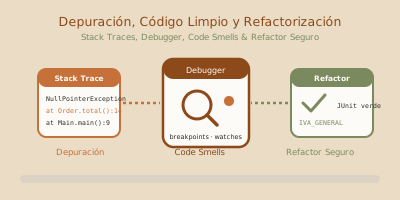
Exception in thread "main" java.lang.NullPointerException: Cannot invoke "Order.subtotal()" because "order" is null
    at OrderCalculator.total(OrderCalculator.java:14)
at Main.main(Main.java:9)- The first line is the exception type and message: they identify what failed.
- Each
at ...line is a call-stack frame, from closest to the failure (top) to the entry point (bottom). - Look for the first frame that belongs to your own code, not a library: that usually holds the useful context for reproducing the problem.
When println is enough, and when it isn’t
System.out.println is fine for a one-off, throwaway check: confirming a method runs, seeing a value once. It stops being enough when:
- the failure depends on timing or concurrency and
printlnitself changes the behavior; - you need to inspect a whole object graph, not an isolated value;
- the point of interest depends on a condition (“only when
itemCount > 10”) and adding anifjust to debug clutters the code; - you need to repeat the inspection many times without recompiling each time.
In those cases, a debugger with breakpoints is more precise and leaves no trace in the source code.
2. The debugger: breakpoints, watches, and stepping
The debuggers in IntelliJ IDEA, Visual Studio Code (with the Extension Pack for Java), and Eclipse share the same vocabulary, even though keyboard shortcuts differ:
- Line breakpoint: pauses execution right before that line runs. Added by clicking the editor’s left gutter.
- Conditional breakpoint: only pauses when a boolean expression is true, e.g.
itemCount > 10. Avoids stopping on every loop iteration when only one case matters. - Watch (watched expression): add an expression to the Watches panel so the debugger evaluates it on every pause, without modifying code to print it.
- Stepping:
- Step over runs the current line without entering the methods it calls.
- Step into enters the method invoked on the current line.
- Step out finishes the current method and returns to its caller.
- Resume lets the program run until the next breakpoint.
- Call stack: the Frames panel shows the chain of methods that led to the current point; it lets you see local variables at every level, not just the current one.
- Variables: the variables panel shows the state of the active scope at each pause; expanding an object navigates its fields without printing them.
3. Clean code: readability as a requirement
Code is read far more often than it is written. Clean code means optimizing for whoever reads it later, including the person who wrote it:
- Meaningful names:
calculateVolumeDiscountcommunicates intent;calc2does not. A well-chosen name reduces the need for comments. - Small methods with a single responsibility: a method should do one thing, and its name should say what. If describing it needs an “and” (“calculates the total and sends the email”), it probably does two things.
- Avoid magic numbers: a bare
0.21scattered through the code does not say what it represents.TAX_RATE = 0.21does, and centralizes the change if the rate changes. - Avoid duplication: the same logic copied in two places means two places to fix the same bug. Fix one and forget the other, and the system becomes inconsistent.
- Comments that explain why, not what:
// add 1 to iadds nothing to code that already saysi++;// adjusted by ±1 day for the provider's timezoneexplains a decision the code alone cannot convey.
Code smells (signs of weak design)
A code smell is not a bug: the program works, but the signal indicates the design will cost more than necessary to maintain.
| Code smell | Symptom | Typical refactor |
|---|---|---|
| Long method | The method grows because it accumulates responsibilities and is hard to name precisely | Extract method |
| Long parameter list | Many primitive parameters, easy to call in the wrong order | Introduce parameter object |
| Duplicated code | The same logic appears copied in more than one place | Extract method / extract class |
| Feature envy | A method uses another object’s data more than its own | Move method |
| Primitive obsession | A String or int models a domain concept (for example, a customer type) instead of its own type | Introduce domain type / enum |
| God class | A class knows and does too much, becoming the contact point for the whole system | Split by single responsibility |
4. Refactoring: changing structure without changing behavior
Refactoring is changing code’s internal structure without altering its observable behavior, backed by a JUnit test suite that is already green. If tests stop passing during a refactor, do not move on: fix it or revert before continuing.
Named refactorings, among the most common:
- Extract method: take a fragment of a long method and turn it into its own method with a name that explains what it does.
- Rename: change the name of a variable, method, or class so it reflects its real purpose.
- Introduce constant / parameter object: replace a literal value with a named constant, or group several related parameters into a single object.
- Replace conditional with polymorphism: when a condition (
if/switch) decides behavior based on a type, move each branch to a type-specific implementation. - Guard clauses: replace nested
if/elsewith early returns that discard invalid cases at the start of the method, reducing nesting.
Before: a method with several code smells
public class OrderCalculator {
    public double total(String customerType, double subtotal, int itemCount, boolean express) {
        double tax;
        if (customerType.equals("REGULAR")) {
            tax = subtotal * 0.21;
        } else if (customerType.equals("WHOLESALE")) {
            tax = subtotal * 0.21;
        } else {
            tax = subtotal * 0.21;
        }
        double discount = 0;
        if (itemCount > 10) {
            discount = subtotal * 0.05;
        }
        if (customerType.equals("WHOLESALE") && itemCount > 10) {
            discount = subtotal * 0.10;
        }
        double shipping = express ? 15.0 : 5.0;
        return subtotal + tax - discount + shipping;
    }
}
total is a long method with a long parameter list: it mixes tax, discount, and shipping calculations; it repeats subtotal * 0.21 three times (duplicated code); it uses 0.21, 0.05, 0.10, 15.0, and 5.0 as magic numbers; and it models customer type with a String compared by equality (primitive obsession).
Before touching a line, two JUnit tests capture the current behavior:
import org.junit.jupiter.api.BeforeEach;
import org.junit.jupiter.api.Test;
import static org.junit.jupiter.api.Assertions.assertEquals;

class OrderCalculatorTest {

    private OrderCalculator calculator;

    @BeforeEach
    void createCalculator() {
        calculator = new OrderCalculator();
    }

    @Test
    void regularCustomerBelowDiscountThreshold() {
        double total = calculator.total("REGULAR", 500, 5, false);
        assertEquals(610.0, total, 0.001);
    }

    @Test
    void wholesaleCustomerAboveDiscountThreshold() {
        double total = calculator.total("WHOLESALE", 1000, 15, true);
        assertEquals(1125.0, total, 0.001);
    }
}
With these tests green, every refactoring step is validated by rerunning them before moving on.
After: same results, structure refactored in small steps
enum CustomerType {
    REGULAR {
        @Override
        public double bulkDiscountRate() {
            return 0.05;
        }
    },
    WHOLESALE {
        @Override
        public double bulkDiscountRate() {
            return 0.10;
        }
    };

    public abstract double bulkDiscountRate();
}

record OrderRequest(CustomerType customerType, double subtotal, int itemCount, boolean express) {
    OrderRequest {
        if (subtotal < 0) throw new IllegalArgumentException("subtotal must not be negative");
        if (itemCount < 0) throw new IllegalArgumentException("itemCount must not be negative");
    }
}

public class OrderCalculator {
    private static final double TAX_RATE = 0.21;
    private static final int BULK_ITEM_THRESHOLD = 10;
    private static final double EXPRESS_SHIPPING = 15.0;
    private static final double STANDARD_SHIPPING = 5.0;

    public double total(OrderRequest request) {
        double tax = calculateTax(request.subtotal());
        double discount = calculateDiscount(request);
        double shipping = calculateShipping(request.express());
        return request.subtotal() + tax - discount + shipping;
    }

    private double calculateTax(double subtotal) {
        return subtotal * TAX_RATE;
    }

    private double calculateDiscount(OrderRequest request) {
        if (request.itemCount() <= BULK_ITEM_THRESHOLD) {
            return 0;
        }
        return request.subtotal() * request.customerType().bulkDiscountRate();
    }

    private double calculateShipping(boolean express) {
        return express ? EXPRESS_SHIPPING : STANDARD_SHIPPING;
    }
}
Each step — introducing the TAX_RATE constant, extracting calculateTax/calculateDiscount/calculateShipping, adding the guard clause in calculateDiscount, replacing the String customerType with the CustomerType enum, replacing the conditional with the polymorphic bulkDiscountRate() method, and introducing OrderRequest as a parameter object — was done separately and validated against the same two tests before moving to the next one. The result is behaviorally equivalent and much easier to extend: adding a third customer type now means adding a constant to the enum, not another branch to the if.
5. Debugging and refactoring are not the same step
- Debugging changes the program’s behavior: it starts from an incorrect symptom and ends in corrected behavior.
- Refactoring preserves behavior: it starts from a green suite and ends in the same green suite, with a different structure.
Mixing them — “since I’m fixing this bug, let me also reorganize the class” — means a broken test can’t say whether it failed because of the original bug, the fix, or the reorganization. The practical discipline is: if a bug shows up while refactoring, stop the refactor, go back to the last green state, fix the bug with its own test, and only then resume the refactor from a stable base.
End of the course
You started with System.out.println("Hello world").
You finish modeling domains with objects, choosing data structures with judgment, handling errors without swallowing them, persisting to files and databases, exposing a REST service backed by tests, and — what you closed out in this last lesson — knowing how to diagnose a bug by method instead of by guesswork, and how to leave code better than you found it without breaking anything along the way.
What changed is not how much syntax you know: it is that you now understand why each tool exists and what problem it came to solve. A constructor is not ceremony, it is the guarantee that an object is born valid. An interface is not bureaucracy, it is what lets you swap the database without touching the logic. A test is not paperwork, it is what lets you refactor without fear. And debugging and refactoring with discipline is not perfectionism, it is what lets you keep touching old code without being afraid to break it.
That is what nobody learns in two hours, and it is exactly what will still serve you when the language of the moment is no longer Java.